
Spell Book Settings
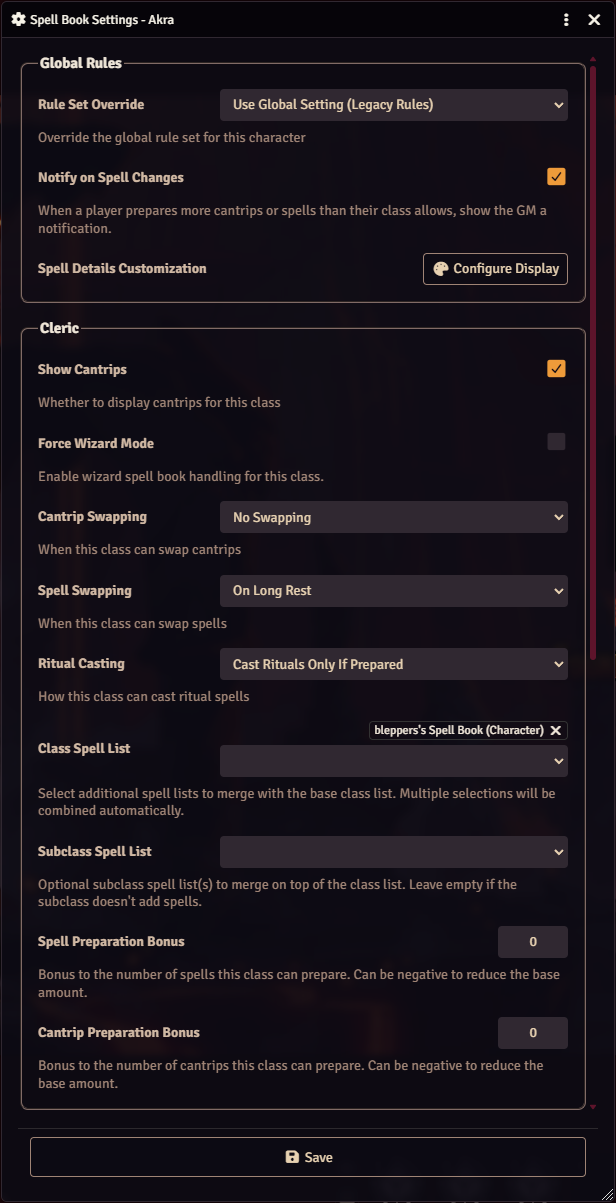
Spell Book Settings configures one actor’s spellcasting classes and overrides world rule settings for that actor.
Opening the dialog
Section titled “Opening the dialog”- The gear button in the Spell Book sidebar.
- The Assign a Spell List button on a class tab with no list. The dialog scrolls to that class and highlights its Class Spell List field.
- The Assign Spell List button on a Spellcasting Gained chat card.
The gear and the class tab button appear only for GMs.
Spellcasting Gained card
Section titled “Spellcasting Gained card”When a character gains a spellcasting class that has no spell list, the module whispers a Spellcasting Gained card to GMs and the actor’s owners. It checks when a class or subclass is added and when an advancement completes. Owning players see an Open Spell Book button in place of Assign Spell List.
Global Rules
Section titled “Global Rules”| Field | Behavior |
|---|---|
| Rule Set Override | Use Global Setting follows the world Default Spellcasting Rules setting. Legacy Rules or Modern Rules sets this actor’s rule set. See Ruleset Types and Meanings. |
| Notify on Spell Changes | Whispers GMs a card when this actor saves changes to prepared cantrips or spells. |
| Spell Details Customization | Configure Display opens Details Customization. |
Rule Set Override does not change the rules of classes already listed in this dialog. It sets the defaults for classes added later.
Notify on Spell Changes starts from the world Notify GM on Spell Changes value. Saving the dialog stores the checkbox value on the actor. After that, changes to the world setting do not affect this actor.
Class sections
Section titled “Class sections”Core fields
Section titled “Core fields”| Field | Behavior |
|---|---|
| Show Cantrips | Hides the class’s cantrips in the Spell Book. Turning this off and saving deletes the class’s cantrips from the actor, except granted and always-prepared ones. Disabled when the class has no cantrip scale value. |
| Force Wizard Mode | Treats the class as a wizard and adds the wizard fields. |
| Cantrip Swapping | When the class can swap cantrips. See swap modes. |
| Spell Swapping | When the class can swap prepared spells. |
| Ritual Casting | How the class casts rituals. See ritual casting modes. |
| Class Spell List | Spell lists the class draws spells from. Multiple lists are merged. |
| Subclass Spell List | Spell lists merged on top of the class list. Has no effect unless the Class Spell List contains spells. |
| Spell Preparation Bonus | Added to the class’s maximum prepared spells. Negative values lower it. |
| Cantrip Preparation Bonus | Added to the class’s maximum cantrips. Negative values lower it. |
Spell list options
Section titled “Spell list options”Both spell list fields offer spell list pages from every journal compendium, grouped into Class, Subclass, and Other. Hidden spell lists are excluded. Stock lists whose spells all come from disabled Compendium Browser sources are also excluded, unless already assigned. An assigned list in that state is labeled source disabled. Disabled sources do not remove spells from an assigned list.
If the character has spells granted by a species or feat, its own granted spell list appears as an option here. Other actors’ granted lists do not. The first time you assign this character a Class Spell List, its granted list is attached to it automatically.
Create and edit lists in the Spell List Manager.
Wizard fields
Section titled “Wizard fields”These fields appear for the wizard class and for any class with Force Wizard Mode on.
| Field | Behavior |
|---|---|
| Spell Learning Cost | Gold pieces per spell level to copy a spell into the spellbook. |
| Spell Learning Time | Minutes per spell level to copy a spell. |
| Starting Spells (Level 1) | Spells the wizard copies at no cost at level 1. Nothing is added automatically. |
| Spells Per Level | Extra no-cost copies for each wizard level after the first. |