
Wizard Spellbook Management
A wizard-enabled class must learn a leveled spell into its spellbook before the spell appears on its preparation tab, unless a feature grants it. Cantrips come straight from the class spell list. Wizard handling applies to the class with the identifier wizard and to any class with Force Wizard Mode enabled in Class Rules.
Each wizard-enabled class has its own spellbook tab and spellbook. See Multiclass Spellcasting.
The spellbook tab
Section titled “The spellbook tab”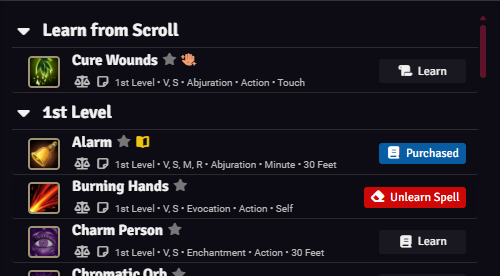
The tab is labeled with the class name followed by “Spell Book”. It lists the leveled spells on the class spell list, up to the highest spell level the character can cast. A Learn from Scroll group at the top lists spells from scrolls in the character’s inventory that are neither on the class spell list nor in the spellbook.
| Row state | Control |
|---|---|
| Not learned | Learn button |
| On a scroll in the inventory | Learn button with a scroll icon |
| In the spellbook | Badge showing how the spell was learned: Level-Up, Purchased, or Scroll |
Hovering a learned badge shows Unlearn Spell. Clicking it removes the spell from the spellbook immediately, with no confirmation and no refund.
The footer shows the learned spell count against the free-copy maximum, plus the free copies remaining. The maximum is not a cap. While Deduct Spell Learning Costs is on, the footer also shows the character’s wealth, and the sidebar adds an Affordable Only filter.
Learning spells
Section titled “Learning spells”Clicking Learn adds the spell at no cost while the class has free copies remaining. After that, a confirmation dialog shows the gold cost and copying time.
While Deduct Spell Learning Costs is on, each row shows its cost and the gold is deducted on confirm. A spell the character cannot afford has a disabled Learn button whose tooltip shows the shortfall. With the setting off, paid copies cost nothing. Settings are described in Installation and Settings.
Copying advances world time only when you approve a GM approval request.
GM approval
Section titled “GM approval”With GM Approval for Spell Copying on, a player’s paid copy becomes a request for you to approve. Free copies and scroll learning do not need approval. See Spell copy approval.
From scrolls
Section titled “From scrolls”Clicking Learn on a scroll row adds the spell without a confirmation dialog. Scroll copies do not use free copies. Charge Cost for Scroll Copying applies the normal copying cost. While Consume Scrolls When Learning is on, learning uses up one scroll from the stack.
A scroll must link to its spell through one of its activities to be learned. Scrolls holding a spell above the highest level the character can cast are not listed.
Free copies, cost, and time
Section titled “Free copies, cost, and time”These values come from the class’s wizard fields in Class Rules:
| Value | Calculation |
|---|---|
| Free copies | Starting Spells + Spells Per Level × (class level - 1) |
| Gold cost | Spell level × Spell Learning Cost Multiplier |
| Copying time | Spell level × Spell Learning Time Multiplier, in minutes |
Every spell in the spellbook that was not purchased or learned from a scroll uses a free copy.
Spell Book does not add starting or level-up spells automatically. The player learns them from the spellbook tab while free copies remain.
Ritual casting
Section titled “Ritual casting”With the class’s Ritual Casting set to Cast Any Known Ritual, saving changes from that class’s preparation tab adds a ritual copy of each leveled ritual spell in the spellbook to the character, prepared or not. After switching to another mode, the next save removes the copies that mode does not allow. See Ruleset Types and Meanings.
Spellbook journals
Section titled “Spellbook journals”Each spellbook is a journal entry in the module’s Custom Spell Lists compendium, in the Actor Spellbooks folder. The journal is named after the character, with the class name appended for classes other than wizard. Players who own the character when the journal is created also own the journal. Deleting the journal empties that spellbook.