Skip to content

Party Spells Interface Overview

The Party Coordinator is a specialized window for viewing and coordinating spells across all party members. It compares known and prepared spells side by side, highlights duplicates, and provides a synergy analysis for the whole party.

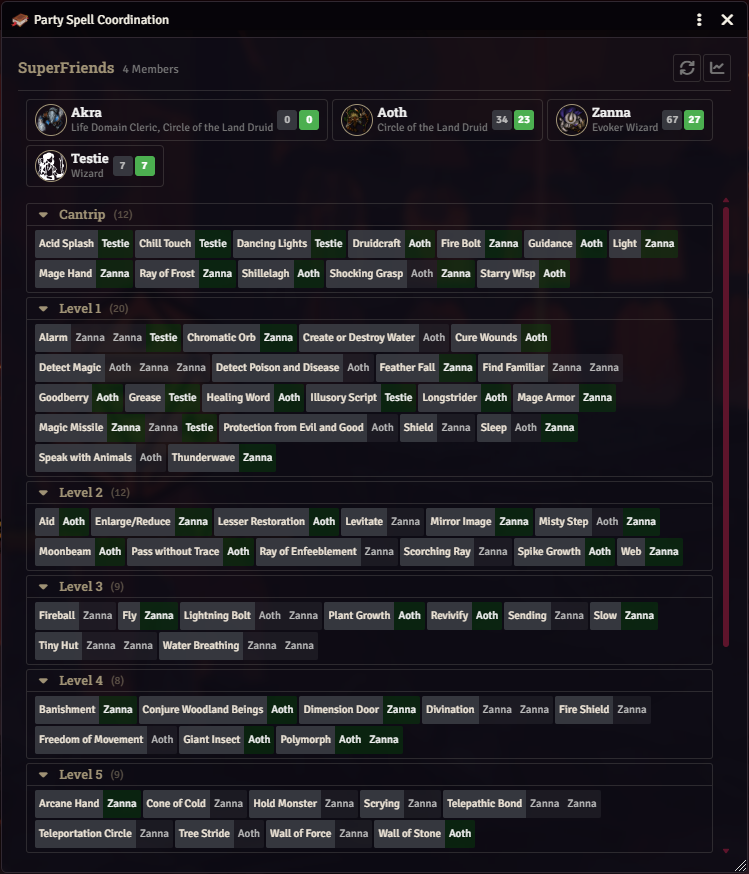
Party Coordinator window showing member cards and the spell comparison matrix


The Party Coordinator relies on dnd5e’s group actors:

  • A group actor (D&D 5e type group) must exist and contain the party’s player characters.
  • That group should be set as the Primary Party in the D&D 5e system settings, or the viewing actor must be a member of a group.
  • Only group members with at least one spellcasting class are included (checked via Object.keys(actor.spellcastingClasses).length > 0).

If no primary party is configured, GMs see a warning and players are prompted to ask the GM to set one up.


The coordinator can be opened in three ways:

  • Group actor sheet (standard dnd5e): a gold-button variant of the Party Spells button is injected next to the long-rest button, via [[onGroupActorRender|scripts/utils/sheets.mjs]].
  • Tidy5e Quadrone group sheet: a party-coordinator-button is injected into the sheet’s header actions container via [[onTidy5eGroupSheetRender|scripts/utils/sheets.mjs]].
  • Player Spell Book sidebar: a users icon (fas fa-users) appears when the viewing actor belongs to a party (hasParty). Left click opens the coordinator; right click toggles Party Mode on the viewing actor.

GMs may open the coordinator for any party; players may only open it for a party they belong to.


When Party Mode is enabled on an actor (FLAGS.PARTY_MODE_ENABLED), each spell row on the Player Spell Book is decorated with small avatar icons showing which other party members have the same spell prepared.

  • Icons are built from each party member’s actor image.
  • Each icon is tinted with the owning user’s user.color.css.
  • The number of icons per row is capped by the PARTY_MODE_TOKEN_LIMIT client setting (range 2 to 8, default 4).
  • The viewing actor is excluded from their own row.

Toggling Party Mode fires a notification and reloads the active tab so indicators render immediately. The toggle lives on the party sidebar button via right-click (see [[player-spell-book.mjs|scripts/apps/player-spell-book.mjs]] _attachPartListeners).


The Party Coordinator is an ApplicationV2 (framed, resizable, titled Party Spell Coordination) with three stacked sections:

  1. Header. Group name, member count, and action buttons: Refresh (sync icon) and Synergy Analysis (line-chart icon).
  2. Member cards. One card per spellcaster in the party.
  3. Spell comparison. A per-level chip-list of every known spell in the party.

Each card displays:

  • Actor token image and name.
  • Enhanced class line (e.g. Lore Bard when a subclass is present), listing every spellcasting class the actor has.
  • Two count badges: Known and Prepared, sourced from the actor’s own prepared-spells flags via [[PartyMode._getActorSpellData|scripts/managers/party-mode.mjs]].

Interactions:

  • Click a card to filter the spell list to that member (_filteredActorId). Clicking the same card again (or clicking outside any card) clears the filter.
  • Hover a card to highlight that member’s prepared spells in the list.
  • Right click a card to open a context menu with Open Actor Sheet. The menu is only shown when the current user has at least Limited permission on that actor.

Members the current user lacks Observer permission for are rendered with a “no permission” state and no spell counts.


Spells are grouped by level, from cantrips to 9th level. Each row shows:

  • An enriched spell icon and name.
  • One chip-style tag per party member who has the spell known or prepared, styled as either prepared or known. Clicking an actor-tag is equivalent to clicking that member’s card.

Level headers:

  • Display the level name and a spell count.
  • Can be collapsed and expanded. Collapsed state is persisted per user via the partyCollapsedLevels flag.
  • When a member filter is active, the count updates to (visible/total) and empty levels are hidden.

The Refresh button drops cached analysis and rebuilds the matrix. Useful after another character’s spell book was saved elsewhere. The window also auto-refreshes on updateActor, createItem, updateItem, and deleteItem hooks scoped to party members.

Data is collected locally: the coordinator iterates the group’s creatures, filters to spellcasters, and reads each actor’s prepared spells directly. There is no socket round-trip.


The Synergy Analysis button opens a companion dialog ([[SynergyAnalysis|scripts/dialogs/synergy-analysis.mjs]]) with an aggregate view of the party’s prepared spells. It is analysis only and never modifies actor data.

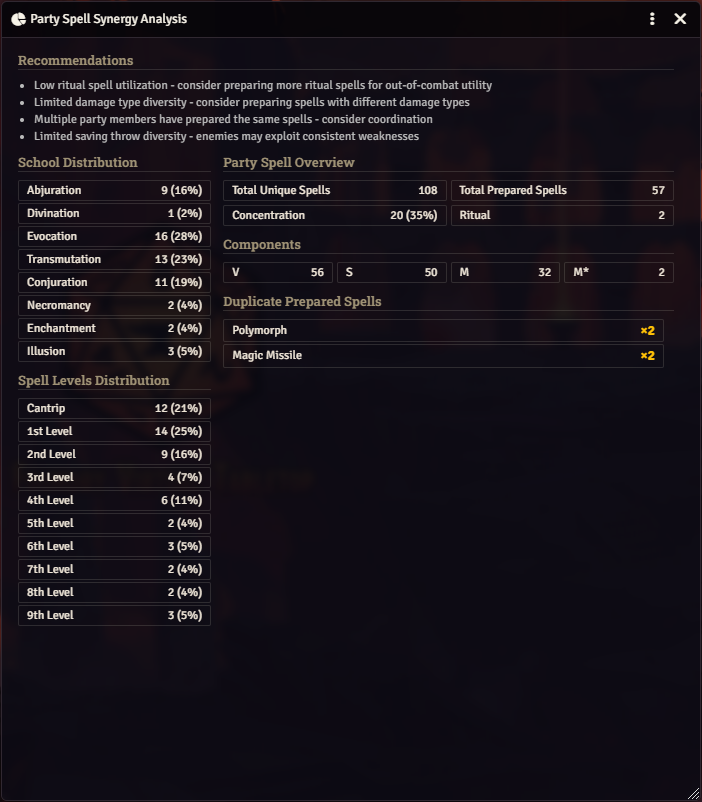
Synergy Analysis dialog showing aggregate party spell statistics

When the numbers cross internal thresholds, the dialog surfaces short text-only recommendations:

  • High concentration usage across prepared spells.
  • Low ritual coverage relative to total known spells.
  • Limited damage-type diversity.
  • Duplicate prepared spells across members.
  • Party loadout heavily weighted toward low-level spells.
  • Limited saving-throw diversity.
  • Total Unique Spells: unique known spells across the party.
  • Total Prepared Spells: unique prepared spells across the party.
  • Concentration: count and percentage of prepared spells that require concentration. Tooltip lists each member’s concentration spells.
  • Ritual: count of prepared rituals. Tooltip lists each member’s ritual spells.
  • School Distribution: count and percentage per school, with member breakdown tooltips.
  • Spell Level Distribution: count and percentage per level (only levels with prepared spells).
  • Damage Types: aggregate damage-type usage, sorted by localized name, with member tooltips.
  • Components: Verbal (V), Somatic (S), Material (M), and Material-costly (M*) counts, each with member tooltips.
  • Duplicate Prepared Spells: spells prepared by two or more members, with a count badge.

All breakdown tooltips render via Foundry’s native data-tooltip-html, showing one line per contributing member.

Only spells on actors the current user can Observe are counted, so GM and player views may legitimately differ.


NameTypePurpose
partyModeEnabledactor flagPer-actor toggle that drives per-spell party indicators on the Player Spell Book.
partyCollapsedLevelsuser flagPersists which spell-level headers are collapsed in the Party Coordinator.
partyModeTokenLimitclient settingMaximum party-member icons shown per spell row in Party Mode (2 to 8, default 4).

  • Observer on a party actor is required to include their spells in the comparison matrix and in synergy analysis.
  • Limited on a party actor is required for the Open Actor Sheet context menu entry.
  • The GM always sees every party member’s data.

  • [[party-coordinator.mjs|scripts/apps/party-coordinator.mjs]]: main Party Coordinator app.
  • [[synergy-analysis.mjs|scripts/dialogs/synergy-analysis.mjs]]: Synergy Analysis dialog.
  • [[party-mode.mjs|scripts/managers/party-mode.mjs]]: getPrimaryGroupForActor, getPartyActors, analysis pipeline, party-mode flag helpers.
  • [[sheets.mjs|scripts/utils/sheets.mjs]]: group-sheet and Tidy5e button injection.
  • [[main.hbs|templates/apps/party/main.hbs]], [[synergy-analysis.hbs|templates/apps/party/synergy-analysis.hbs]].
  • [[constants.mjs|scripts/constants.mjs]]: PARTY_MODE_TOKEN_LIMIT, FLAGS.PARTY_MODE_ENABLED, FLAGS.PARTY_COLLAPSED_LEVELS.