Spell Loadouts
A Spell Loadout is a named snapshot of a character’s prepared spells for a single spellcasting class. Once saved, a loadout can be reapplied later to restore that exact preparation set, without stepping through the Spell Book tab by tab.
Loadouts are stored on the actor as flags, persist across sessions, and are scoped to the class they were created on.
Opening the Dialog
Section titled “Opening the Dialog”Loadouts are managed from the Player Spell Book (PSB):
- Open the Spell Book on an actor.
- Switch to the class tab whose loadouts you want to manage (Cleric, Wizard, etc.).
- Click the Loadouts toolbox icon (
fa-toolbox) in the PSB sidebar.
The button is wired to the openLoadoutDialog action on the Spell Book application. It resolves the active tab’s class identifier and opens a LoadoutSelector dialog scoped to that class.
The dialog title reads Loadouts - {class}, for example Loadouts - Wizard.
[!NOTE] Loadouts are per class. A loadout saved while the Cleric tab is active does not appear in the Wizard tab, and vice versa.
Right-Click Quick-Select
Section titled “Right-Click Quick-Select”Right-clicking the same sidebar button opens a ContextMenu listing every saved loadout for the active class. Clicking an entry applies that loadout immediately, using the same path as the dialog’s Apply action, and refreshes the class tab in place. If no loadouts exist for the class, the menu shows a disabled “No loadouts” entry.
The menu is built lazily: a capture-phase contextmenu listener rebuilds menu.menuItems just before each open, so the list always reflects the current state without needing a re-render. Opening the full dialog is still done via left-click.
Dialog Layout
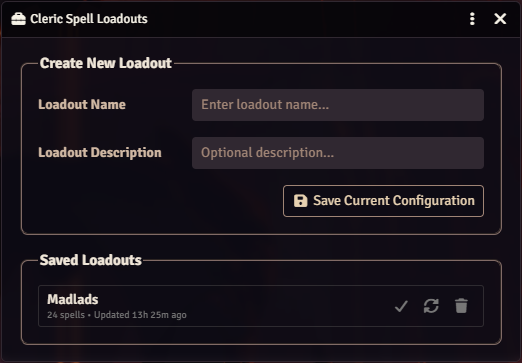
Section titled “Dialog Layout”
The dialog is a standard-form ApplicationV2 (520px wide, non-resizable, supports detached-window rendering via detachedRenderOptions(parent)).
It is divided into two fieldsets.
Create New Loadout
Section titled “Create New Loadout”| Field | Required | Purpose |
|---|---|---|
| Loadout Name | Yes | Human-readable label shown in the list. Trimmed before saving. |
| Loadout Description | No | Optional note. Appears inline next to the loadout name. |
| Save Current Configuration button | n/a | Captures the live checkbox state for the active class and stores it as a new loadout. |
Validation:
- Empty name: rejected with
SPELLBOOK.Loadouts.NameRequired("Loadout name is required"). - Empty spell set: rejected with
SPELLBOOK.Loadouts.NoSpellsPrepared("No spells are currently prepared to save").
On success, the form resets and the dialog re-renders with the new entry in the list.
What “Current Configuration” Means
Section titled “What “Current Configuration” Means”Save does not read the actor’s persisted prep flag. It calls parent.getCurrentPreparedUuids(classIdentifier) on the PSB, which resolves the spell set in this order:
- Live checkboxes in the rendered class tab: the boxes currently ticked by the user, even if the sheet hasn’t been saved yet.
- Pending changes stored for the tab (for tabs that were edited then switched away from but not yet submitted).
- Actor flag (
flags.spell-book.preparedSpellsByClass) as a last fallback if the tab isn’t loaded.
This means players can design loadouts interactively (tick the spells they want, name the loadout, save) without ever committing the prep to the sheet.
Saved Loadouts
Section titled “Saved Loadouts”Each existing loadout renders as a row with two regions:
Left side, text block:
- Name and optional description.
- Meta line:
{count} spells • Last updated {relative time}(viafoundry.utils.timeSince).
Right side, action group (icon-only, bare buttons that pick up theme color on hover):
| Icon | Action | Behavior |
|---|---|---|
fa-check | apply | Writes the loadout’s UUIDs as the class’s prepared set, refreshes the PSB class tab, closes the dialog. |
fa-sync-alt | overwrite | Replaces the loadout’s spellConfiguration with the currently-captured spell set. Name/description preserved; updatedAt bumped. |
fa-trash | delete | Confirmation prompt, then removes the loadout. Icon turns red on hover. |
Hover tooltip (right-positioned HTML tooltip) previews every spell in the loadout, sorted by level then name, each rendered with a 1.25 rem circular thumbnail pulled from spell.img. The tooltip is built in LoadoutSelector.#buildSpellListTooltip and passed through the data-tooltip-html attribute on the row.
If no loadouts exist for the class, the list is replaced by a SPELLBOOK.Loadouts.NoLoadouts notice.
Delete Confirmation
Section titled “Delete Confirmation”Clicking Delete opens a DialogV2.confirm titled SPELLBOOK.Loadouts.ConfirmDelete, rendered with detachedRenderOptions(this) so it detaches cleanly on the popout. Cancelling leaves the loadout untouched. On confirm, Loadouts.deleteLoadout is called; this removes the entry from the actor flag and invalidates the cache. Loadouts are actor flags, not journal pages, so no custom-spell-list cleanup is involved.
Apply Behavior
Section titled “Apply Behavior”LoadoutSelector.applySpellConfiguration(actor, classIdentifier, loadoutUuids) performs the update:
- Reads the current prepared set from
flags.spell-book.preparedSpellsByClass. - Builds the union
current ∪ loadout. - For each UUID, resolves the spell via
fromUuidSyncand constructs an entry with:isPrepared:trueif the UUID is in the loadout.wasPrepared:trueif the UUID was currently prepared.spellLevel,name,isRitual: read from the resolved spell.
- Hands the combined map to
SpellManager.saveClassSpecificPreparedSpells, which performs the actual grant/revoke work on the actor. - Calls
parent.refreshClassTab(classIdentifier)so the PSB re-renders the tab with the new checkbox state immediately.
Implications:
- Spells prepared before apply but not in the loadout are unprepared.
- Spells in the loadout that were not previously prepared become prepared.
- Spells in both sets are preserved.
- UUIDs in the loadout that no longer resolve (source spell deleted or moved) are silently skipped.
The same applySpellConfiguration is used by both the dialog’s Apply button and the right-click quick-select menu.
Per-Class Scoping
Section titled “Per-Class Scoping”Loadouts.getLoadouts(actor, classIdentifier) returns:
- Every loadout whose
classIdentifiermatches, plus - Any legacy loadouts with no
classIdentifier(treated as class-agnostic).
The dialog and quick-select always pass the active class identifier, so only loadouts belonging to that class are listed. Applying targets that class exclusively; other classes’ prepared spells are untouched.
Storage
Section titled “Storage”Loadouts live in an actor flag at:
actor.flags[spell-book][spellLoadouts][{classId}][{loadoutId}]The flag is a keyed object: { [loadoutId]: loadoutObject }. Each loadout has this shape:
{ id: 'randomID', // foundry.utils.randomID() name: 'Combat Prep', // trimmed description: 'AoE + control', // optional, may be '' classIdentifier: 'wizard', // the class this loadout belongs to spellConfiguration: [ // array of canonical spell UUIDs 'Compendium.dnd5e.spells.Item.abc...', 'Compendium.dnd5e.spells.Item.def...' ], createdAt: 1713532800000, // Date.now() updatedAt: 1713532800000 // Date.now(), bumped on overwrite}Loadouts keeps a WeakMap cache of the flag per actor. Every write path (save, overwrite, delete) calls invalidateCache so the next read sees fresh data.
Loadouts Manager API
Section titled “Loadouts Manager API”The static methods on scripts/managers/loadouts.mjs form the data layer. No DOM code; safe to call from macros or other modules.
| Method | Signature | Returns | Notes |
|---|---|---|---|
Loadouts.getLoadouts | (actor, classIdentifier = null) | Array<Loadout> | With a class id, filters to that class plus entries missing classIdentifier. With null, returns all. Uses the cache. |
Loadouts.getLoadout | (actor, loadoutId) | Loadout | null | Reads the flag directly; bypasses the cache. |
Loadouts.saveLoadout | (actor, classIdentifier, name, description, spellConfig) | Promise<string | null> | Creates a new loadout with a generated id. Returns the id, or null if name is empty. |
Loadouts.deleteLoadout | (actor, loadoutId) | Promise<boolean> | Removes via -= flag deletion. Returns false if the id was not present. |
Loadouts.invalidateCache | (actor) | void | Drops the cached flag for that actor. Call after direct actor.update writes to the loadouts flag. |
There is no public “apply” helper on Loadouts. The apply path lives in LoadoutSelector.applySpellConfiguration (a static method) because it depends on SpellManager.saveClassSpecificPreparedSpells. To apply programmatically, call LoadoutSelector.applySpellConfiguration directly or reproduce the same call into SpellManager.
scripts/api.mjs does not currently export any loadout-related helpers.
Theme Support
Section titled “Theme Support”All action buttons use themed colors and read correctly under both dark and light themes. Bare icon buttons desaturate to muted by default and pick up accent color on hover; the delete button hovers red regardless of theme.
Related Pages
Section titled “Related Pages”- [[SpellBook-Interface-Overview]]
- [[Class-Rules]]
- [[Spell-Preparation-System]]