Skip to content

Spell Preparation System

Manages how spellcasting characters prepare and cast spells. Tracks per-class preparation, supports multiclass, granted, always-prepared, and ritual spells, and surfaces informational notifications when limits are exceeded.

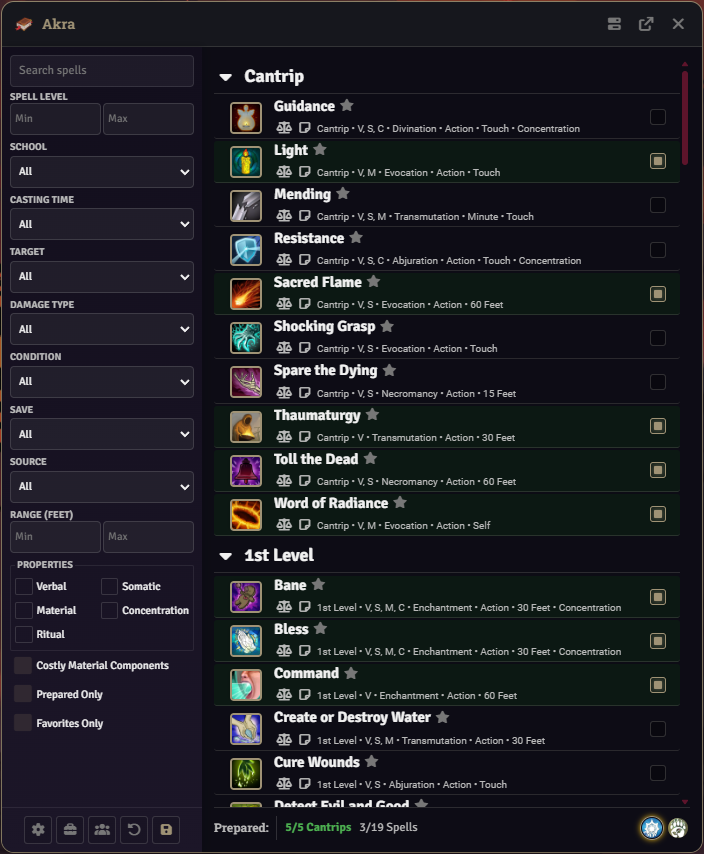
Player Spell Book window showing a class prepare tab with footer counters


Preparation limits are derived from the dnd5e system based on each class’s spellcasting ability modifier and class level. Spell Book reads these values and displays them alongside the current prepared count in the tab footer (current/max Spells and current/max Cantrips).

Limits are informational. Preparation checkboxes stay enabled regardless of whether the player is at, under, or over their max. When the current count reaches the printed max, the counter gains an at-max highlight (green — reading as “at capacity, all good”). Going over the max is allowed and triggers a notification only (see Notifications).

Preparation state in the Spell Book UI is sourced from live checkbox state, not from the saved actor data. Toggling a checkbox updates the tab’s counters immediately and stages the change in an in-memory map (#pendingChanges) keyed by tab and spell UUID. Pending changes persist across tab switches, so you can edit preparation on multiple class tabs before saving.

The Save button collects every checkbox across every loaded tab (reapplying any pending changes from non-active tabs first) and writes the per-class prepared spell sets to the actor in a single update. Changes are not persisted until Save is pressed.

The Reset button in the sidebar footer clears all filters. Shift-clicking Reset additionally unchecks every non-disabled preparation checkbox across every prepare tab; those unchecks are staged in #pendingChanges and persisted on Save. This makes it easy to wipe preparation and re-prepare from scratch without saving intermediate state.

Each spellcasting class needs a spell list assigned via Class Rules before preparation can happen. Spells are not auto-loaded; the class’s customSpellList (and optionally customSubclassSpellList) determines which spells appear in the prepare tab. There is no implicit subclass-registry fallback — if neither is set, the tab shows a “No spell list assigned” notice.

Spell Book supports two rule sets that control swap and cantrip defaults:

Rule SetDescription
Legacy (2014)Traditional D&D 5e rules. No cantrip swapping by default.
Modern (2024)Cantrip swapping on level-up or long rest (class-dependent).

Each class can override the world default. See Ruleset Types and What They Mean for the full class-specific defaults table.


  1. Open the character’s Spell Book.
  2. Navigate to the class-specific preparation tab (if multiclass).
  3. Toggle spell checkboxes. The footer counters update live.
  4. Optionally switch to another class tab — your pending changes are preserved.
  5. Press Save in the sidebar to commit all pending changes to the actor.
  1. Uncheck the spells to remove.
  2. Check the new spells to add.
  3. Save.

Swap modes (see below) do not gate these edits. The player may add or remove any available spell at any time. The counters are informational.

After a long rest, a prompt can appear offering to open the Spell Book to manage spell changes. The prompt can be disabled per-client via DISABLE_LONG_REST_SWAP_PROMPT. The actual preparation UI behaves the same regardless of rest state.


Each class has a cantrip limit derived from dnd5e scale values. The setting CANTRIP_SCALE_VALUES is a comma-separated list of scale keys checked in order, with the first match winning. This lets the module pick up both system cantrip scales and homebrew keys.

Cantrip counts are displayed in the tab footer alongside the max. Like spell limits, the max is informational; exceeding it only fires a notification.

Per-class swap settings (cantripSwapping, spellSwapping) accept three modes:

ModeValue
Nonenone
Level-UplevelUp
Long RestlongRest

These modes are informational per-class settings. They do not gate preparation changes. They drive the long-rest swap prompt and tracking flags used by the prompt flow. Cantrip changes that fall outside the configured swap window will warn the user via ui.notifications.warn but the underlying system never blocks.

Per-class spellPreparationBonus and cantripPreparationBonus values add to the class’s calculated max. These are configured via Class Rules. The bonus is added to the printed maximum shown in the footer counter.


Three ritual casting modes are available per class (ritualCasting):

ModeValueBehavior
NonenoneRituals require preparation like any other spell.
PreparedpreparedPrepared spells with the ritual property can also be cast as rituals.
AlwaysalwaysThe class can cast any ritual spell from its spellbook without preparing it. Primarily wizard-focused.

Under always, the save handler automatically injects ritual copies of any eligible rituals from the wizard’s spellbook onto the actor. When a class’s ritual mode changes away from always, stale module-created ritual items (flagged isModuleRitual: true) are cleaned up on save.


Spells granted by class features, subclass grants, or racial traits:

  • Render with a tag chip (e.g., Always Prepared, Granted).
  • Show a disabled preparation checkbox with a tooltip explaining the source.
  • Do not count against preparation limits.

Multiclass characters get separate preparation tabs per class. Limits, swap settings, ritual mode, preparation bonuses, and spell lists are resolved independently per class identifier. Pending changes are tracked per tab, and Save writes all tabs in one operation.


The preparation system never blocks a player. Over-limit situations are surfaced as notifications only, and the notification behavior is controlled by the world setting Notify GM on Spell Changes (NOTIFY_GM_ON_SPELL_CHANGES).

Each actor can override this per-class via the Spell Book Settings in Class Rules (notifyGm flag). The per-class flag is a boolean and defaults to the world setting value when unset.

  • During editing: When notifyGm is effectively true, checking a cantrip or spell beyond the class’s max triggers a ui.notifications.info to the current user with the over-limit counts.
  • On save: A whispered ChatMessage is sent to all GMs summarizing per-class additions plus removals (and any over-limit state). Classes with no changes are omitted.

Both layers are controlled by the same notifyGm resolution. Disabling it silences both.