Skip to content

Details Customization

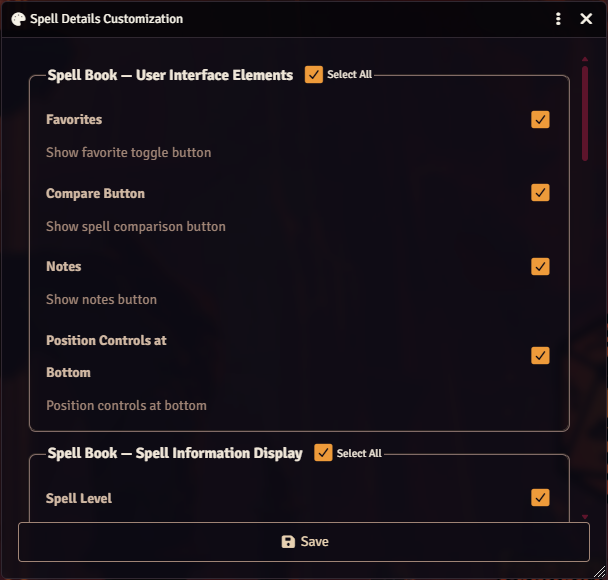
The Spell Details Customization dialog is a per-user configuration menu that controls which UI buttons and metadata fields appear on spell rows and in the sidebars of the Player Spell Book and the Spell List Manager. It also sets the color used for the wizard book icon and the sidebar controls position.

All toggles are stored as individual client-scope settings, so every user can configure their own view without affecting other players or the GM.

The dialog is registered as a settings menu named spellDetailsCustomization and is not restricted, so both players and GMs can open it. It can be reached from three places:

  • Game Settings -> Configure Settings -> Spell Book -> Configure Display (paint-palette icon).
  • The palette button in the Spell List Manager footer.
  • The Open Details Customization button in the global fieldset of Spell Book Settings (the per-actor dialog). When the Spell Book Settings window has been detached, the Details Customization window opens into the same detached instance.

Details Customization dialog

The dialog uses the standard-form pattern with one fieldset per section. Each fieldset contains a Select All checkbox in its legend that toggles every member checkbox in the group on or off. The select-all also reflects an indeterminate state when only some members are checked.

GMs see the two Spell List Manager fieldsets in addition to the player fieldsets. Non-GM users see only the player fieldsets and the color picker.

[!NOTE] The Notify on Spell Changes toggle is not in this dialog. It is a per-actor toggle in Spell Book Settings and a world-level setting in Installation and Settings.

Controls buttons rendered on each spell row in the Player Spell Book and a layout flag for the sidebar.

ToggleSetting KeyEffect
FavoritesplayerUIFavoritesShows the favorite toggle button on spell rows
Compare ButtonplayerUICompareShows the spell comparison button on spell rows
NotesplayerUINotesShows the notes button on spell rows (see Spell Notes)
Position Controls at BottomsidebarControlsBottomMoves sidebar controls to the bottom of the sidebar

Controls which metadata fields are joined into the subtitle shown beneath each spell name. Enabled fields are joined with a bullet separator in the order listed.

ToggleSetting Key
Spell LevelplayerUISpellLevel
Spell ComponentsplayerUIComponents
School of MagicplayerUISchool
Casting TimeplayerUICastingTime
RangeplayerUIRange
Damage TypesplayerUIDamageTypes
ConditionsplayerUIConditions
Saving ThrowplayerUISave
ConcentrationplayerUIConcentration
Material ComponentsplayerUIMaterialComponents

Spell List Manager -> User Interface Elements (GM only)

Section titled “Spell List Manager -> User Interface Elements (GM only)”
ToggleSetting KeyEffect
Compare ButtongmUICompareShows the spell comparison button in the Spell List Manager

Favorites and Notes are intentionally unavailable on the GM side.

Spell List Manager -> Spell Information Display (GM only)

Section titled “Spell List Manager -> Spell Information Display (GM only)”

Mirrors the player metadata list with independent gmUI* storage so the GM’s Spell List Manager view is independent from their own Spell Book view.

ToggleSetting Key
Spell LevelgmUISpellLevel
Spell ComponentsgmUIComponents
School of MagicgmUISchool
Casting TimegmUICastingTime
RangegmUIRange
Damage TypesgmUIDamageTypes
ConditionsgmUIConditions
Saving ThrowgmUISave
ConcentrationgmUIConcentration
Material ComponentsgmUIMaterialComponents

A color picker that sets the fill color of the wizard book icon used throughout the module. Stored in the wizardBookIconColor client setting (nullable ColorField).

  • Use User Color button: copies your Foundry user color into the picker.
  • Reset button: restores the picker to the currently saved value.
  • Leaving the field blank clears the override and falls back to the default icon color.

Clicking Save writes every toggle to its respective client setting and closes the dialog. After saving, the dialog calls refreshDisplay() on every open SpellBook and SpellListManager application instance. That refresh re-reads getEnabledPlayerElements / getEnabledGMElements and invalidates any cached formattedDetails, so changes take effect immediately without needing a reload.

  • Every toggle is an independent client-scope BooleanField with an initial value of true.
  • sidebarControlsBottom defaults to false.
  • wizardBookIconColor defaults to null.
  • Because all settings are client-scoped, each user’s customizations persist across sessions but never propagate to other users.