
Events
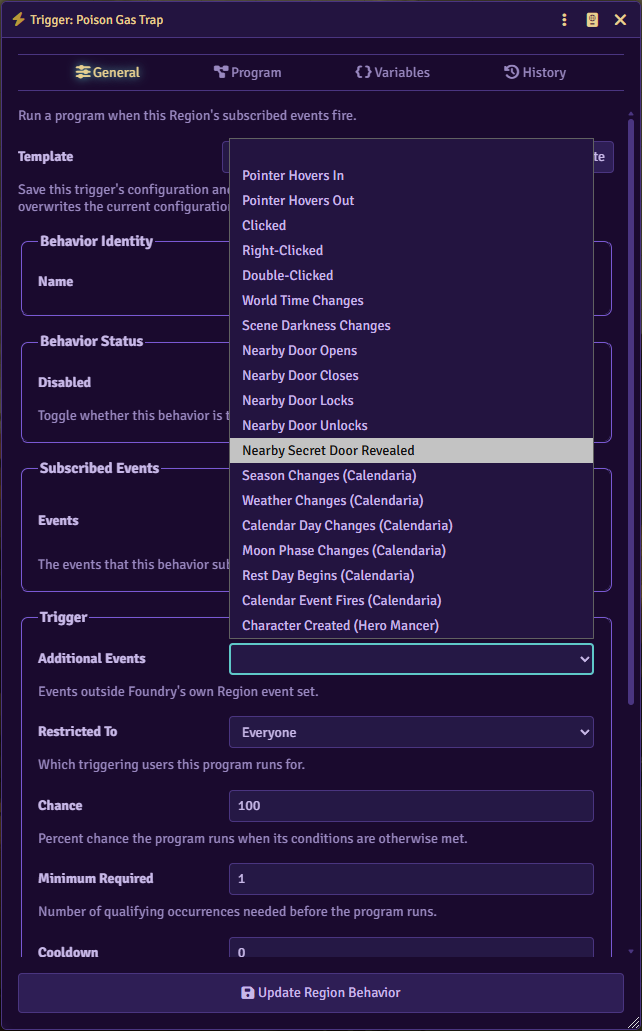
A trigger’s General tab has two event fields: Events, for Foundry’s own Region events, and Additional Events, for everything else Glyph adds. A trigger can subscribe to more than one event, and each gets its own handler on the Program tab.
A hidden Region or a disabled trigger behavior never receives an event, no matter which one fires.
Region events
Section titled “Region events”| Event | Fires when |
|---|---|
| Region Boundary Changed | The Region’s shape, elevation, levels, or restriction changes. |
| Region Animation State Changed | The Region’s animation state changes. |
| Behavior Activated | This trigger behavior turns on: enabled, created enabled, or its Region becomes visible while enabled. |
| Behavior Deactivated | This trigger behavior turns off: disabled, deleted, or its Region becomes hidden. |
| Behavior Viewed | This trigger behavior is active and its Region’s scene is the one the primary GM is viewing. |
| Behavior Unviewed | This trigger behavior goes inactive, or the primary GM stops viewing its scene. |
| Token Enters | A token enters the Region, including one created inside it. |
| Token Exits | A token leaves the Region, including one deleted while inside it. |
| Token Moves In | A token’s movement carries it into the Region. |
| Token Moves Out | A token’s movement carries it out of the Region. |
| Token Moves Within | A token moves while already inside the Region. |
| Token Animates In | A token’s movement animation enters the Region. |
| Token Animates Out | A token’s movement animation leaves the Region. |
| Token Starts Turn | A token inside the Region starts its combat turn. |
| Token Ends Turn | A token inside the Region ends its combat turn. |
| Token Starts Round | A token inside the Region starts the combat round. |
| Token Ends Round | A token inside the Region ends the combat round. |
Behavior Activated, Behavior Deactivated, Behavior Viewed, and Behavior Unviewed fire only for this trigger’s own behavior, not for other behaviors on the same Region. Token Animates In and Token Animates Out only fire on the scene the primary GM is viewing. Every other event in this table fires no matter which scene is active.
Additional Events
Section titled “Additional Events”Additional Events cover pointer interaction, activity Glyph tracks directly, and hooks two other modules provide.
Pointer
Section titled “Pointer”| Event | Fires when |
|---|---|
| Pointer Hovers In | The pointer enters the Region. |
| Pointer Hovers Out | The pointer leaves the Region. |
| Clicked | The Region is clicked. |
| Right-Clicked | The Region is right-clicked. |
| Double-Clicked | The Region is double-clicked. |
| Double-Right-Clicked | The Region is double-right-clicked. |
A pointer event runs for whichever user clicked or hovered, not only the GM. It only tests Regions on the scene that user currently has open. The cursor turns into a pointer while hovering a Region listening for hover or any click variant.
Tokens
Section titled “Tokens”| Event | Fires when |
|---|---|
| Token Created Inside | A token is created inside the Region. |
| Token Rotates Inside | A token already inside the Region changes its facing. |
Both fire on every scene, not only the one currently viewed.
Combat
Section titled “Combat”| Event | Fires when |
|---|---|
| Combat Starts | Combat begins on the Region’s scene. |
| Combat Round Advances | The round number changes. |
| Combat Turn Starts | A combatant’s turn starts. |
| Combat Turn Ends | A combatant’s turn ends. |
| Combat Ends | The encounter ends. |
These follow the combat’s own scene, not necessarily the one a client is viewing.
Scene, time, and lighting
Section titled “Scene, time, and lighting”| Event | Fires when |
|---|---|
| Scene Loads | The primary GM’s own canvas finishes loading a scene. |
| Canvas Lighting Changes | The primary GM’s currently viewed scene’s rendered lighting changes. |
| Scene Darkness Changes | A scene’s Darkness Level changes. |
| World Time Changes | The world clock advances or is set. |
Scene Loads and Canvas Lighting Changes only fire for the scene the primary GM has open. Scene Darkness Changes and World Time Changes fire across every scene.
| Event | Fires when |
|---|---|
| Nearby Door Opens | A nearby door’s state changes to open. |
| Nearby Door Closes | A nearby door’s state changes to closed. |
| Nearby Door Locks | A nearby door’s state changes to locked. |
| Nearby Door Unlocks | A nearby door’s state changes from locked to closed. |
| Nearby Secret Door Revealed | A nearby secret door’s type changes so it’s no longer secret. |
“Nearby” means the Region’s shape contains the door wall’s midpoint, not that the whole door lies inside it. These fire on the door’s own scene, not only the one being viewed.
Calendaria
Section titled “Calendaria”Requires the Calendaria module.
| Event | Fires when |
|---|---|
| Season Changes (Calendaria) | The calendar’s season changes. |
| Calendar Day Changes (Calendaria) | The calendar day changes. |
| Moon Phase Changes (Calendaria) | The moon’s phase changes. |
| Rest Day Begins (Calendaria) | A calendar rest day begins. |
| Weather Changes (Calendaria) | The calendar’s weather changes. |
| Calendar Event Fires (Calendaria) | A scheduled calendar event triggers. |
These fire across every scene.
Hero Mancer
Section titled “Hero Mancer”Requires the Hero Mancer module.
Character Created (Hero Mancer) fires when Hero Mancer finishes creating a new character, across every scene.
Event data
Section titled “Event data”An event can carry the token involved, a click’s point and modifier keys, the active combat, or a door’s wall. Program actions and conditions read these through placeholders; see Placeholders and Conditions for the field paths.