
Stable / Mounts
Wiki updated as of 0.7.0 (Oct 2026)The stable is The Muddy Hoof, run by a folksy horse-trader. It sells mounts as real creature actors, sells tack off the wall, boards and shoes the players’ mounts, and buys horses back. With Travel Pace active it can also sell passage to destinations you set.
The shop renders on the Tack Bench theme. A step tracker on the bench follows the purchase: pick a mount, kit it out, then board it. The farrier service runs its own three steps on the same bench.
Setting it up
Section titled “Setting it up”Click Create Peddler Shop on the merchant’s actor sheet and pick Stable / Mounts in the Shop Builder. The archetype sets the dialogue tree, the shop title, the Tack Bench theme, an accent color, and an ambient track. It presets no opening hours, haggling, or tab limit.
Mount source
Section titled “Mount source”Mounts come from creature actors you already have. Open Peddler Shop Settings on the shop actor and find the Mounts section on the Settings tab. It appears only on stable shops.
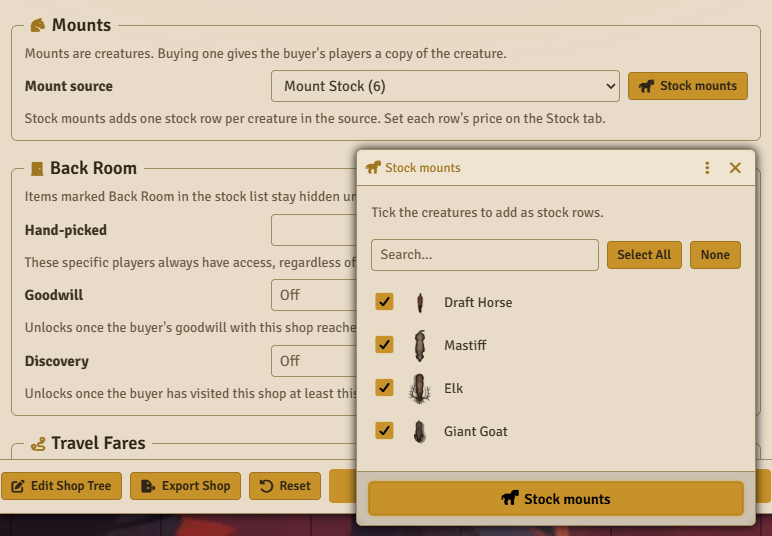
- Pick an Actor folder or an Actor compendium as the Mount source. Folders include their subfolders.
- Click Stock mounts, tick the creatures to sell, and confirm. Each one becomes a stock row with a quantity of one.
- Set each mount’s price on the Stock tab.
A mount without a price does not appear in the corral. Running Stock mounts again lists only creatures that are not already stocked.
Everything else in stock is tack. The tack wall lists every in-stock item that is not a mount, so stock saddles, bridles, feed, and the like as normal items. See Stock and Restocking.
Passage
Section titled “Passage”The I need to get somewhere choice appears only while the Travel Pace module is active and the shop has at least one destination under Travel Fares in Shop Settings. A destination without a name or distance is left off the list.
What players can do
Section titled “What players can do”Buy a mount
Section titled “Buy a mount”Show me what you’ve got opens the corral. From there the player can browse the horses, look them over, or haggle.
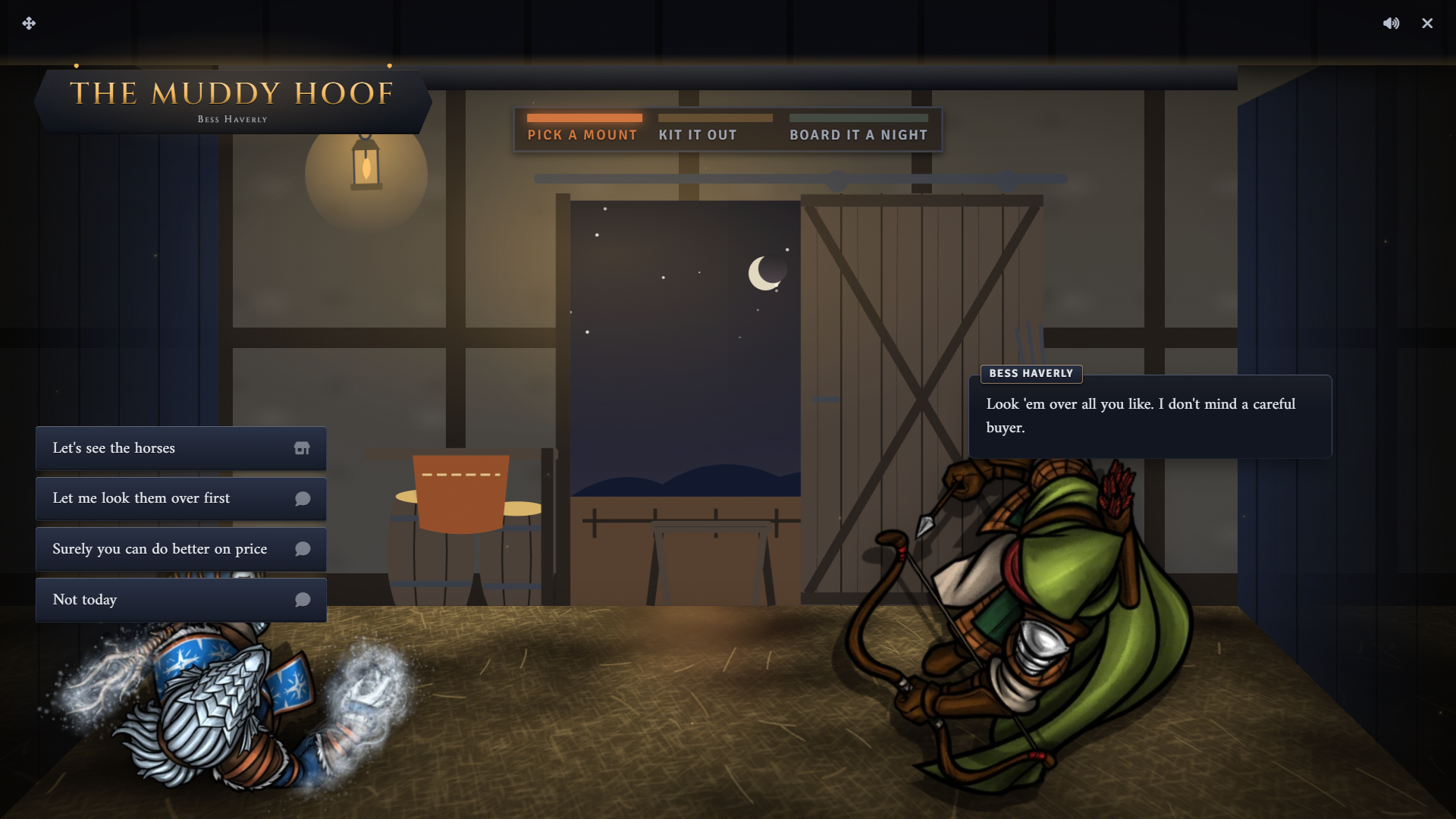
Buying a mount creates a new actor copied from the source creature. It goes into a world Actor folder named Mounts, which Peddler creates the first time. The buyer’s players own the new actor and everyone else can observe it. Buying more than one creates one actor each. No item is added to the buyer’s inventory.
Buying a mount also lowers that buyer’s prices at this shop, which the keeper explains as tack at cost. After the corral, the keeper offers the tack wall, then offers to board the new mount.
Look-over and haggle
Section titled “Look-over and haggle”Both are skill checks against two DCs, taken once per buyer until the next morning. They are hidden on systems with no skill list.
- Let me look them over first rolls the system’s animal skill. A good or great result earns a discount on the buyer’s purchases that lasts until morning. The player claims it with Hold you to that.
- Surely you can do better on price rolls the barter skill. A great result lowers the buyer’s prices at this shop by a tenth, and a failure raises them by a tenth. This change stays on the buyer at this shop.
Owned mounts
Section titled “Owned mounts”The farrier, boarding, and buy-back choices appear only when the buyer’s players own a creature that came from the shop’s mount source. A creature counts if it sits in the source folder or was created from a creature in the source. Each service starts by asking which mount.
Boarding
Section titled “Boarding”Can you board my horse? boards one owned mount for one night, three nights, or a week. Longer stays cost less per night. The keeper also offers boarding right after a mount is bought. A buyer can board one mount at a time at each stable.
Boarding is a record on the shop. The mount’s actor is not moved or hidden.
I’m here for my horse appears while a mount is boarded. Collecting ends the stay. Each night past the paid stay goes on the buyer’s tab at the nightly rate, even when the shop has no Tab Limit.
Farrier
Section titled “Farrier”She needs new shoes quotes a fee for a set of shoes. The player can pay it or barter with That’s steep for four bits of iron. Winning the barter lowers the fee and takes a tenth off the buyer’s other prices here. Losing raises the fee and adds a tenth.
After paying, the player picks a mount and it receives the Freshly shod effect for about a week. The effect comes from the Peddler Effects compendium, and its bonus depends on the system adapter. On some systems it carries no mechanical change.
Buy-back
Section titled “Buy-back”I’ve a horse to sell lets the player sell an owned mount back. The offer is what the buyer paid for it, or the mount’s stock price when it was not bought here, times the shop’s sell rate. When neither price exists, the keeper declines.
Accepting pays the buyer, deletes the mount’s actor, and puts one back on its stock row. A boarded mount sold this way ends its stay.
Passage
Section titled “Passage”I need to get somewhere lists one choice per destination, with its travel time and fare. The fare is charged when the player picks it.
Running it
Section titled “Running it”Approving fares
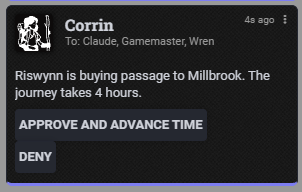
Section titled “Approving fares”Buying passage whispers a request card to the GMs and the buying player. Click Approve and Advance Time to advance world time by the journey length, or Deny to refund the fare. Only GMs see the buttons.
Boarding reminders
Section titled “Boarding reminders”With Calendaria active, boarding adds two notes on the day the paid nights end. A hidden note reminds the GM, and a visible note reminds the buyer’s players in chat. Both notes are removed when the mount is collected or sold. Without Calendaria, boarding still tracks the due date against world time.
Late fees from collection are recorded in the shop log, and outstanding tabs are listed on the History tab of Shop Settings.
System notes
Section titled “System notes”On Draw Steel, the buy-back choice is hidden. See System Adapters.
The look-over check uses the system adapter’s animal skill. Systems without a skill list hide the look-over, haggle, and farrier barter.
Customizing
Section titled “Customizing”Edit the dialogue in the Dialogue Tree Editor. The editor offers the stable’s building blocks for any tree: the Owns a Mount, Mount Boarded, and Boarding Overdue conditions, the Mount stock filter, and effects to board, collect, and buy back the picked mount. The Fare Node toggle on a dialogue node generates the passage choices, leading to its Fare Target.
Re-applying the archetype from Dialogue Archetype in Shop Settings overwrites the tree. The mount source and stocked mounts are kept. See Shop Archetypes.