
Apothecary
Wiki updated as of 0.7.0 (Oct 2026)The Bitter Root is run by an anxious apprentice who talks the whole time. She asks what ails the customer, points them at the right shelf, fortifies a flask they already carry, brews remedies to order, and buys herbs.
Setting it up
Section titled “Setting it up”Pick the Apothecary archetype on the Basics step of the Shop Builder, as covered in Shop Archetypes. The archetype applies the Herb Bench theme on the bench chassis, a rose accent color, and a looping herb-shop ambient track. It sets no opening hours, haggling, tab, or restock presets. Turn those on in Shop Settings if you want them.
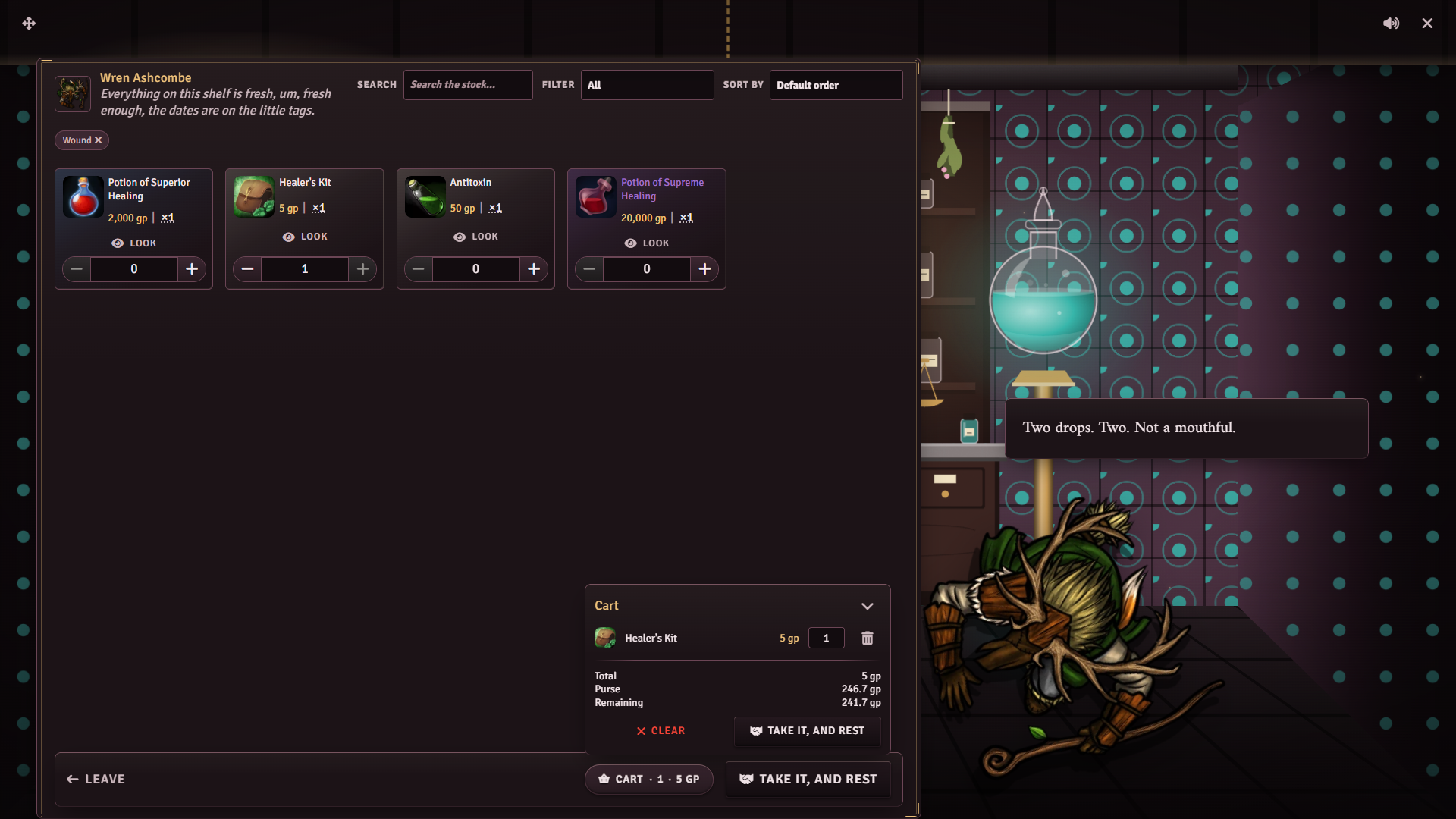
The bench room’s centrepiece is a shelf of jars between two glowing glass globes. The shelf fills with jars as you add items to the shop actor, and stands empty when the shop has no stock.
Stocking the shelf
Section titled “Stocking the shelf”The main shelf shows everything in stock. Tag remedies with a symptom in the stock manager’s Pool & Tags view so the intake can narrow the shelf. The intake uses four lowercase tags:
| Tag | Player’s answer |
|---|---|
fever | I’m burning up |
wound | I took a bad cut |
nerves | I can’t sleep, my nerves are shot |
unsure | Honestly, I don’t know |
Once a player answers, the shelf shows only items carrying that tag. Untagged items drop out of that view. Tag a few gentle remedies unsure, or the shelf is empty for a player who does not know what is wrong. Tagging is covered in Stock and Restocking.
Fortifying and the herb counter read the player’s own inventory, not the shop’s stock. Which item types count as a flask or an herb depends on the system. See System notes.
What players can do
Section titled “What players can do”Symptom intake
Section titled “Symptom intake”Something’s wrong with me leads to the intake. The player names a symptom, and the apprentice answers with a matching line and offers the shelf. The shelf opens filtered to that symptom, and a chip above it shows the filter. The player can clear the chip to see the whole shelf, or pick Actually, it’s something else to answer again.
The examination
Section titled “The examination”Look me over yourself rolls the system’s examine skill against two DCs. Beating the lower DC earns a discount on the shelf, and beating the higher one earns a deeper discount. The player claims it with Show me what’ll help, which opens the shelf. A miss sends the player back to the intake. The discount lasts until the next morning in world time, and the character cannot be examined again before then.
Fortifying a flask
Section titled “Fortifying a flask”Fortify something I’m carrying quotes a fee for cutting a flask with grey root. The player can pay it or try Surely you can do better, a barter roll against two DCs that each character gets once until the next morning.
| Result | Fee | Shelf prices for that character |
|---|---|---|
| Beats both DCs | Lower | A tenth cheaper |
| Beats one DC | Standard | Unchanged |
| Beats neither | Higher | A tenth dearer |
The shelf change is saved as a per-player price modifier and stays on the shop between visits. Clear it under Per-Player Price Modifiers, as covered in Haggling and Pricing.
The fee is charged when the player picks the pay choice. The player then hands over a flask from their inventory. Leaving the flask picker does not refund the fee, and a character carrying no flask sees an empty picker. Picking a flask grants the Steadied effect to the character for one hour. The flask itself stays in their inventory.
The bench shows the job on a three-stage track: Uncorked while the player pays and picks, Steeping while the apprentice works, and Stoppered when Steadied is granted.
Remedies brewed to order
Section titled “Remedies brewed to order”Could you brew something to order? offers three tiers: a tincture, a wound salve, and a strong elixir. Each tier carries a suggested price and brewing time, and higher tiers cost more and take longer. The player types what they are after and sends the request to you. A character can have one order at a time with each shop.
Once the brewing time has passed, Is my order ready? starts the collection. Until then the apprentice says it is still steeping.
The herb counter
Section titled “The herb counter”I’ve herbs to sell opens a sell shelf with the player’s herb items. The shop pays at its sell rate, covered in Haggling and Pricing.
Running it
Section titled “Running it”Remedy orders need a GM logged in. When a player requests one, a Special Order Request dialog opens for you with the request, the tier, and the tier’s suggested price and time. Change Price and Ready in (days) as needed, then click Send quote or Turn it down. The player sees the quote with its payment terms and places the order or declines. Special Order Payment in Shop Settings sets how much is paid up front.
With the Calendaria module active, placing an order adds a GM-only calendar note to make the remedy and a pickup note for the player.
When the player asks to collect a ready order, a Special order window opens for you. Drag the finished item from the sidebar or a compendium onto it and click Hand over. The player gets a copy of the item after paying anything still due. Not ready tells the player to come back later.
System notes
Section titled “System notes”Archetype fees and suggested remedy prices scale to the system’s currency.
| System | Flasks | Herbs | Examine | Barter | Steadied |
|---|---|---|---|---|---|
| D&D 5e | Potions and poisons | Potions, poisons, and material loot | Medicine | Persuasion | +1 to saving throws |
| Pathfinder 2e | Potions, elixirs, oils, and poisons | The same, plus drugs | Medicine | Diplomacy | No stat change |
| D&D 4e | Consumables | Consumables and loot | Heal | Diplomacy | +1 to saving throws |
| Daggerheart | Consumables | Consumables and loot | Knowledge | Presence | No stat change |
| Call of Cthulhu 7e | Item-type items | Item-type items | Medicine | Persuade | No stat change |
| Draw Steel | Consumables | Consumables | Reason with Heal | Presence with Persuade | No stat change |
| Other systems | Any sellable item | Any sellable item | None | None | No stat change |
The examination and barter choices are hidden when the system has no skill list. On other systems, set one on the System tab, as covered in System Adapters.
Steadied lives in the Peddler Effects compendium. Change what it does through Reference Effects on the System tab, since applying an archetype can reset edits made to the compendium entry.
Customizing
Section titled “Customizing”Edit any line, choice, or price in the Dialogue Tree Editor. The flask picker and the herb counter each use an item filter you can change there. Switching the shop to a different archetype rebuilds the tree and discards your edits.