
Hacker
Wiki updated as of 0.7.0 (Oct 2026)The Hacker archetype runs The Night Market, a data fence that does business in a chat channel. Players type slash commands or keywords to browse files, sell, buy rumours and tips, pick up dead drops, and place orders.
Setting it up
Section titled “Setting it up”Open the Shop Builder from Create Peddler Shop in the merchant’s actor sheet header and pick Hacker on the Basics step. To convert an existing shop, pick it in the Dialogue Archetype field of Shop Settings. The archetype hub covers both routes.
The archetype applies:
- The dialogue tree
- The shop title The Night Market
- The Underweb theme on the terminal chassis
- A green accent color
- Haggling turned on
- Shop Queue turned off
See Queue and Sessions for the queue.
Choosing a room
Section titled “Choosing a room”Underweb has two rooms, Terminal Client and Modern Client. Change the room with the Room field in Shop Settings. See Themes and Chassis.
What players can do
Section titled “What players can do”Players type slash commands or plain words in the channel. Keywords such as list, sell, or order reach the matching choice.
Several players in the shop see each other’s lines, and a player who joins late sees recent history.
| Command | What it does |
|---|---|
/list | Relists the files. |
/look <n> | Opens a file. |
/buy <n> [qty] | Queues a file. |
/sell <n> [qty] | Offers a file. |
/pick <n> | Picks an item to hand over. |
/names | Shows who is here. |
/whois <nick> | Looks someone up. |
/msg <nick> <text> | Whispers someone. |
/me <action> | Emotes. |
/help | Lists the commands. |
/quit | Disconnects. |
Each dialogue choice also gets a command named by its command word. The commands shown depend on the current screen, and /help lists them.
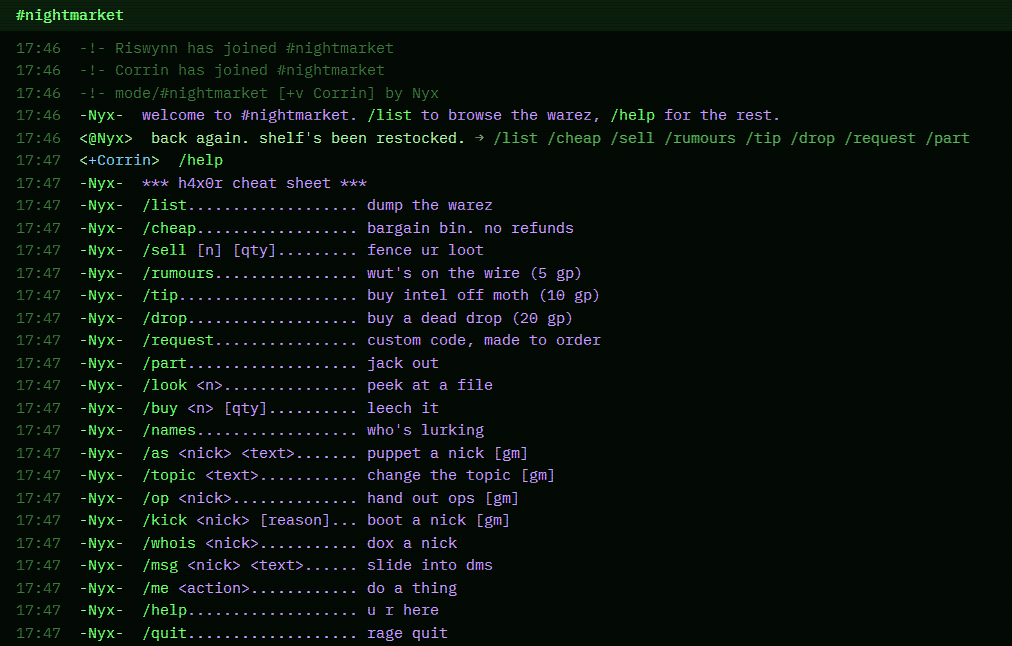
Trace is the Hacker’s name for heat, and /whois shows it. See Heat for the rules and the settings reference for the values.
Dead drops and orders
Section titled “Dead drops and orders”Players can buy a dead drop, collect it before it goes cold, and order a script, an exploit, or a zero-day. Each order is ready after a delay. With Calendaria active, you get a note to prepare the order and the buyer’s players get a note when it is ready. These notes stay hidden from other players.
Running it
Section titled “Running it”A code order opens a Special Order Request dialog on your client. When the buyer collects, drag the finished item or a journal entry into the Special order window and click Hand over. The buyer’s players get Observer access to a journal. A GM must be logged in to quote or hand over an order.
These commands appear only for a GM:
| Command | What it does |
|---|---|
/as <nick> <text> | Speaks as a nick. |
/topic <text> | Sets the channel topic. |
/op <nick> | Raises a player’s character to the top standing rung. |
/kick <nick> [reason] | Ends that player’s visit. |
Customizing
Section titled “Customizing”Open the tree in the Dialogue Tree Editor to change the fees, the order tiers, and the command words. Roll difficulties come from the archetype section of Shop Settings.
Reapplying the archetype rebuilds the tree and discards your edits.