
Itinerant Trader
Wiki updated as of 0.7.0 (Oct 2026)The Itinerant Trader runs Wandering Wares, a painted wagon pitched by the road. The trader opens at dawn and is packed up and gone before noon. Everything sells from the wagon’s hatch.
Setting it up
Section titled “Setting it up”Pick Itinerant Trader on the Basics step of the Shop Builder, as covered in Shop Archetypes. Applying the archetype sets:
- The Wagon Stall theme, a blue accent, and a looping ambient track.
- Opening hours from dawn until late morning, every day, with hours enforced.
- Haggling turned on with a three-row price ladder, a price rise on a failed roll, and one attempt per visit.
Adjust the hours and the ladder in Shop Settings. The archetype adds no stock and does not restock on its own. Stock the wagon as described in Stock and Restocking.
The wagon scene
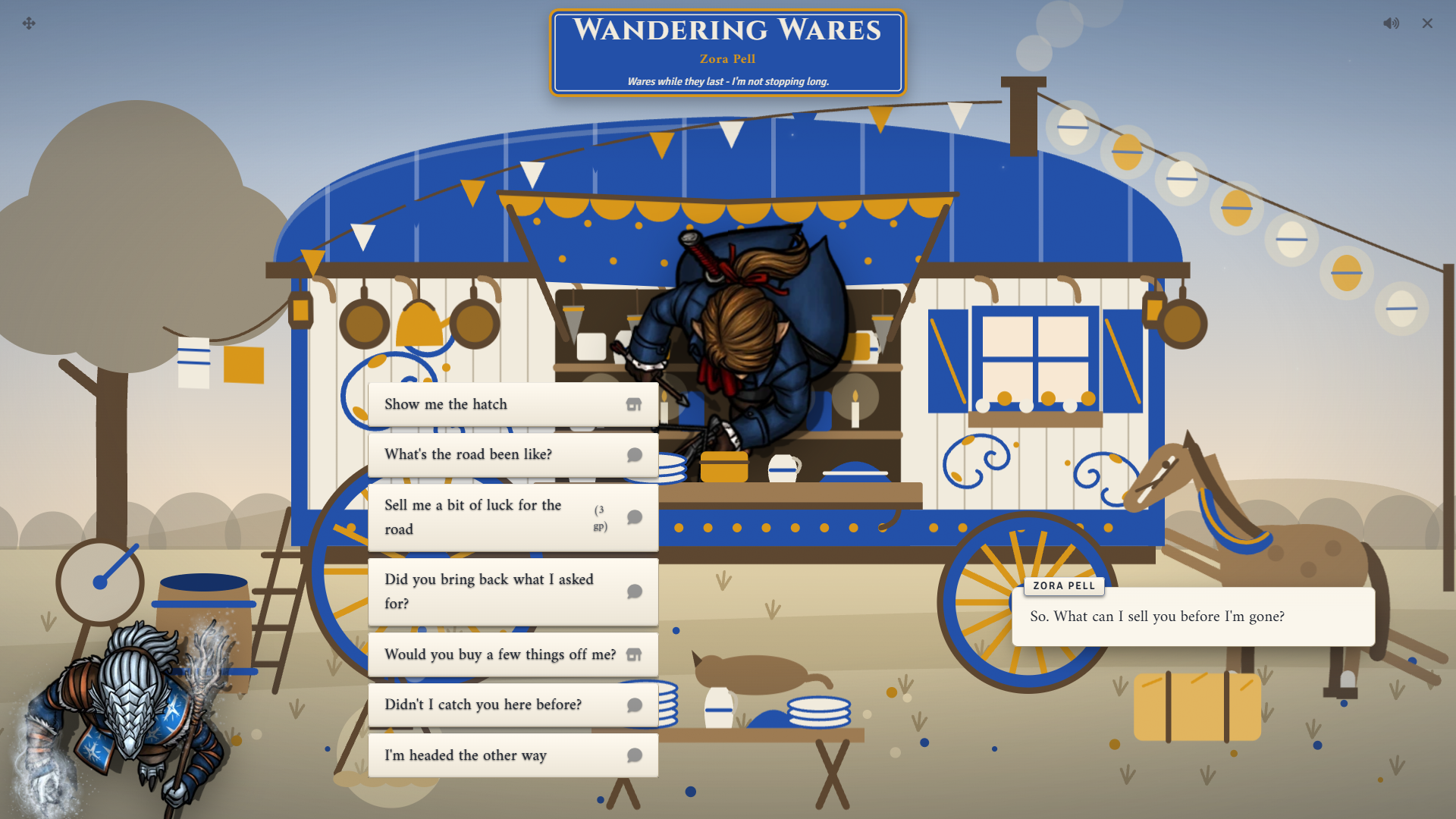
Section titled “The wagon scene”The stall chassis shows a vardo as the centrepiece, with a countdown to closing on the masthead. Scenery props surround the wagon, and all of them show by default. Switch them on or off from the Scene panel of the layout editor. See Themes and Chassis.
Passage
Section titled “Passage”The tree has a seat-on-the-wagon branch for selling passage. It appears only while the Travel Pace module is active and the shop has at least one destination under Travel Fares in Shop Settings.
What players can do
Section titled “What players can do”The greeting changes with the visit. A first-time customer, a returning one, and a customer in the last hour before closing each hear different lines. Choices that do not apply stay hidden.
Browse and haggle
Section titled “Browse and haggle”Show me the hatch opens the stock. The trader sometimes comments as items go in and out of the cart. The Haggle button works as described in Haggling and Pricing.
A returning customer gets an extra greeting choice that leads straight to the stock.
Road charm
Section titled “Road charm”Sell me a bit of luck for the road costs a small fee and grants Road Luck, an effect from the Peddler Effects compendium that lasts a day. Each character can buy one charm until the next morning.
Road tales
Section titled “Road tales”What’s the road been like? offers a tale swap. The player picks a skill and rolls against three rising DCs. The trader answers with better road news for each DC the roll beats, and a top result plays a chime. A character can tell one tale until the next morning. Tell me that news again repeats the reply.
Packing up
Section titled “Packing up”During the last hour before closing, the trader asks for help loading the wagon. The player rolls a hauling check. On a success, Show me what’s left, then opens the stock with a discount for that character that lasts until morning. A failure earns no discount. Each character gets one try until the next morning.
Selling
Section titled “Selling”Would you buy a few things off me? opens a sell screen where the trader buys from the player.
Fetch orders
Section titled “Fetch orders”Could you bring something back for me? offers three tiers: near, far, and rare. Each tier carries a suggested price and wait, longer and dearer as the tier rises. After picking a tier, the player describes what they want.
Each character can have one fetch order with the trader at a time. Once an order is placed, Did you bring back what I asked for? replaces the fetch choice. If the wait has not passed, the trader says it is still on the road.
Passage
Section titled “Passage”Have you room for a passenger? lists one choice per destination with its fare and travel time. Paying sends the request to you, and the visit moves to the farewell.
Running it
Section titled “Running it”Quoting a fetch order
Section titled “Quoting a fetch order”When a player asks for a fetch order, a Special Order Request dialog opens for you. It shows the tier, the player’s request, and a price and wait prefilled from the tier. Change either, then click Send quote, or click Turn it down.
The player accepts with Place the order or declines with Not today. When the player pays is set by Special Order Payment in Shop Settings. With Calendaria active, placing the order adds a GM-only reminder to prepare it and a pickup reminder for the player.
Handing it over
Section titled “Handing it over”When the player collects a ready order, a Special order window opens for you. Drag the finished item or items onto it, then click Hand over. The player then sees the order with any balance due and clicks Pay or Take. Click Not ready instead to send the player away until later.
A GM must be connected to quote or hand over an order.
Approving passage
Section titled “Approving passage”Buying passage whispers a request card to the GMs and the buyer. Approve and Advance Time advances world time by the journey length. Deny refunds the fare.
When the wagon has gone
Section titled “When the wagon has gone”Outside opening hours, a player who visits finds an empty pitch with fresh wheel ruts instead of the trader. This is the tree’s closed-shop rule, which you can change in the Dialogue Tree Editor. Use Override in Shop Settings to open the wagon outside its hours.
System notes
Section titled “System notes”- Fees and fetch-order prices scale to the system’s currency.
- Road Luck adds to initiative in D&D 5e, Pathfinder 2e, and D&D 4e. In other systems it is a descriptive effect with no stat change.
- In D&D 5e, tales use History or Performance, and packing up uses Athletics. Other systems map these checks to their own skills.
- Tales and packing up need a system with skills. Without them, both choices stay hidden and the trader shares the road news for free.
- In Draw Steel, the sell choice is hidden because Wealth is never paid out.
See System Adapters for each system’s details.
Customizing
Section titled “Customizing”Edit any line, choice, cost, or DC in the Dialogue Tree Editor. Edit the Road Luck effect in the Peddler Effects compendium to change what the charm grants. To change the fetch tiers’ suggested prices and waits, edit the effects on the tier choices.