
Tavern / Inn
Wiki updated as of 0.7.0 (Oct 2026)The Tavern / Inn is an evening shop run by a warm innkeeper. Players buy food and drink at the bar, take a bed for the night, pick up rumours, play games against the regulars, and sometimes get caught in a brawl. The keeper also runs a slate for regulars who drink on credit.
Setting it up
Section titled “Setting it up”Create the shop with the Shop Builder and pick the Tavern / Inn archetype. See Shop Archetypes.
What the archetype applies
Section titled “What the archetype applies”Besides the dialogue tree, the archetype sets:
- The Taproom Counter theme, its accent color, and a tavern ambient track.
- Opening hours every day of the week, from evening until after midnight, with Enforced on.
- A Tab Limit, so buyers can drink on credit.
- Restock on Day Change, which only takes effect while Calendaria is active.
- Happy hour defaults in the Tavern: Happy Hour section.
Change any of these afterwards in Shop Settings. Values and ranges are on the Settings Reference.
Tavern settings
Section titled “Tavern settings”Tavern shops show a Tavern: Happy Hour section on the Settings tab. Happy Hour Starts and Happy Hour Ends set the window, which can wrap past midnight. Happy Hour Modifier multiplies buy prices during that window. The keeper also has her own happy hour greetings.
Allow Unlimited Play lets a character play each tavern game as often as they like. With it off, each game can be played once per night.
What to stock
Section titled “What to stock”The bar sells whatever is in stock on the shop actor. Food, drink, and other consumables suit it best.
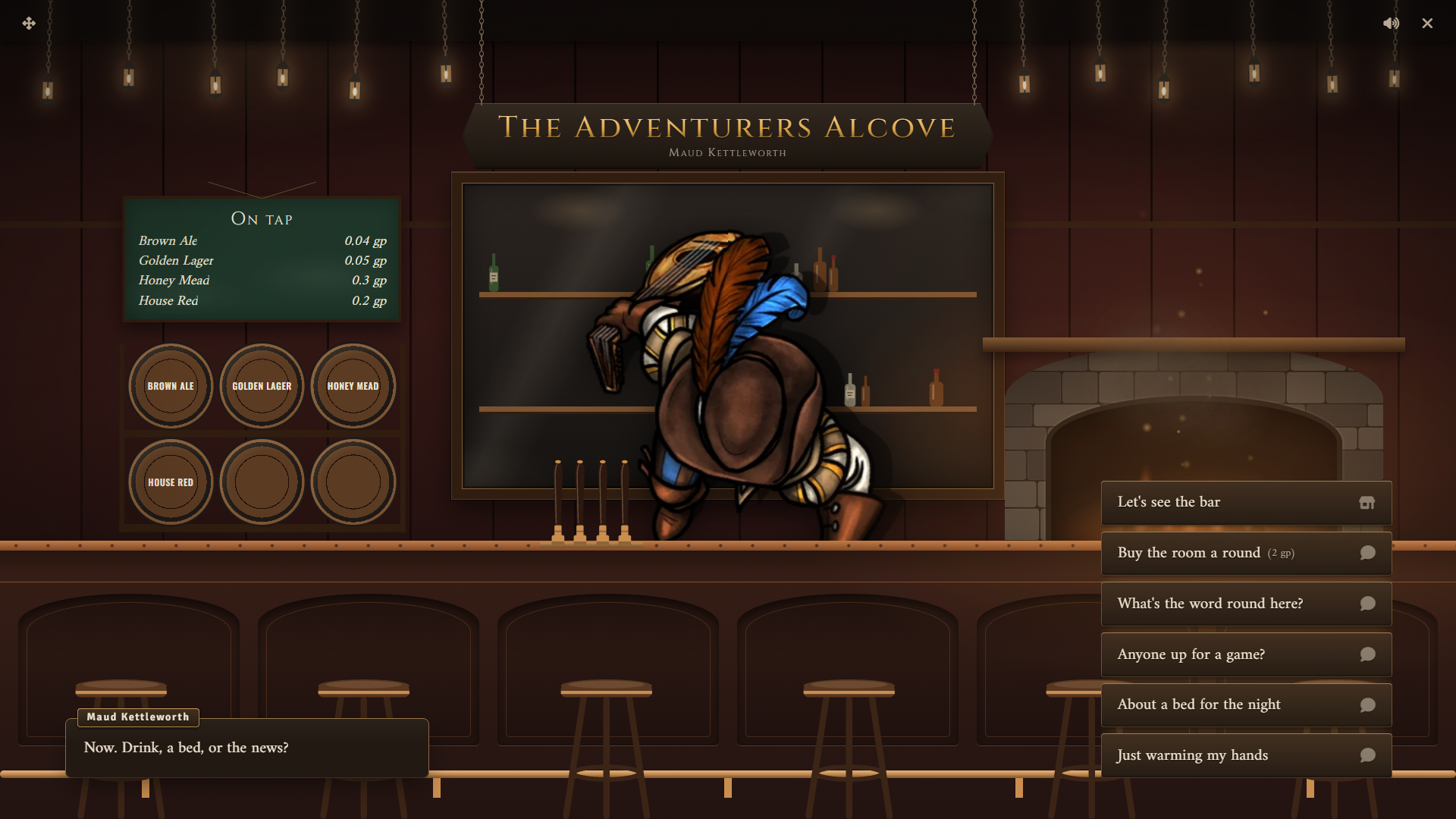
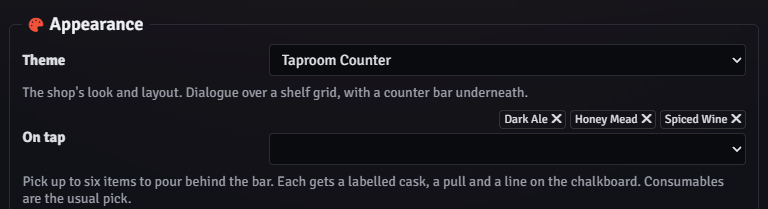
Use the On tap field in the Settings tab to pick up to six items to pour behind the bar. The field appears only while the shop uses the Taproom Counter theme. Each tap gets a cask and a line on the On tap chalkboard in the vignette.
Taps matter beyond decoration:
- Only drinks bought from the taps count toward unlocking rumours.
- A character’s last tap drink becomes their usual. Same as ever, then in the greeting adds it straight to the cart while it is in stock.
What players can do
Section titled “What players can do”The greeting offers the bar, a round for the room, rumours, games, a bed, and settling the slate. Each character’s choices reset at the next morning, so a character gets one room, one rumour check, and one brawl per night.
Rooms and rests
Section titled “Rooms and rests”About a bed for the night offers three options:
- A private room costs coin and always allows a rest.
- A bunk in the common room is cheaper and rolls a flat check to see how the night goes. A good night allows a rest. A bad night means no rest. On a natural 1 the character rests but wakes up with coin missing from their purse.
- Is my room still going? appears once a character has spent enough at the tavern to count as a regular. Their room is free.
Taking a bed whispers a rest card to the GM. The card names the character, the room, and the price, plus the common room outcome if there was one. When a rest is allowed, the card has a Rest {name} button and, when the system has a party, a Rest the party button. Nothing happens to the characters until you click one.
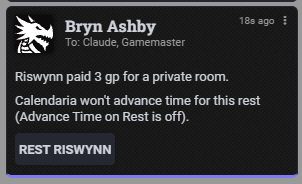
Clicking a button runs the system’s own rest for those characters. Peddler then advances the world clock to the next morning, unless the system’s rest already moved time. When Calendaria is active with its Advance Time on Rest setting off, the card shows a warning and the clock does not move.
A round for the room
Section titled “A round for the room”Buy the room a round costs coin and posts a public chat message. The buyer gets a discount at the tavern until morning. Standing a round also makes rumours easier to get.
Rumours
Section titled “Rumours”What’s the word round here? shows the rumours the character has unlocked. The keeper has three rumours of rising weight, plus small talk for anyone who has unlocked none.
A character unlocks deeper rumours by drinking more from the taps that night. Ask around a bit is a skill check against three DCs, once per night, and each DC beaten unlocks one more rumour. Standing a round counts as one step toward each rumour.
The rumour text is fixed in the tree. Rewrite the lines on the node labelled The word going round in the Dialogue Tree Editor to fit your campaign.
Games against the regulars
Section titled “Games against the regulars”Anyone up for a game? leads to the back table and three regulars:
- Dice with Old Hobb is a straight d20 against the house. It needs no skill.
- Darts with Wat and Arm wrestling with Bram are skill checks against a DC.
Each game asks for one of three stakes before the roll. A win pays the stake from that game’s pot and a loss adds it to the pot. Each pot is limited and refills at the next morning. When a pot runs low, a winner is paid what is left and the regular says so.
Brawls
Section titled “Brawls”On the first entry of each day, the tavern rolls a small chance of a brawl. When one breaks out, every character entering that day lands in it until they have dealt with it. The player picks one of three moves, each a skill check:
- Wade in earns goodwill on a win.
- Duck has no reward beyond staying clear.
- Break it up earns more goodwill and a discount until morning on a win. A loss also puts breakages on the character’s slate.
A lost check deals a little damage to the character. Where the system has no skill table, the only option is Keep your head down, which avoids the brawl.
The slate
Section titled “The slate”The tavern’s tab works like any other tab. A character short at checkout can put the rest on the slate up to the Tab Limit. While they owe anything, Settle my slate appears in the greeting and opens a card to pay it down. Outstanding tabs are listed on the History tab of Shop Settings.
Running it
Section titled “Running it”The rest card is the only tavern step that waits for you. Rumours, games, and brawls resolve on their own, with the rolls posted to chat.
The tavern is closed outside its opening hours. Use Override in Shop Settings to open it for a scene outside those hours.
System notes
Section titled “System notes”Rooms, rests, and brawl damage depend on the system adapter:
| System | Rest | Brawl damage |
|---|---|---|
| D&D 5e | Long rest, as a party rest when everyone resting is in the party | Bludgeoning damage |
| Pathfinder 2e | Rest for the Night, characters only | Needs a token for the character on a scene |
| D&D 4e | Long rest | Physical damage |
| Daggerheart | Opens the downtime dialog for the character’s owner | Physical damage to hit points |
| Draw Steel | Respite, heroes only | Damage through the system |
| Call of Cthulhu 7e | Recovery, with a summary posted to chat | Damage that ignores armor |
The generic adapter has no rests and no brawl damage. Rest cards still post with the room and price but have no rest buttons. Skill checks for rumours, darts, arm wrestling, and brawls need a skill table, which you can add on the System tab of Peddler Settings.
Customizing
Section titled “Customizing”The tree is a normal Peddler dialogue tree. Edit lines, names, and choices in the Dialogue Tree Editor. Switching the shop’s archetype in Shop Settings replaces the tree and loses your edits.
The vignette layout, casks, and keeper position are part of the Taproom Counter theme. See Themes and Chassis.