
Dropped Goods
Wiki updated as of 0.7.0 (Oct 2026)A Dropped Goods pile is a map note that holds items and loose coins. Anyone can open it and hand out its contents. A GM must be logged in for players to drop, take, or give anything.
Dropping items
Section titled “Dropping items”A player drags an item from a sheet they own onto the canvas. If the item is a stack, a Drop How Many? dialog asks for the amount. The item leaves the character’s inventory and lands in a new pile, shown as a map note with the item’s icon. A new pile takes the elevation and level of the spot where the item was dropped. Dropping close to an existing pile on the same level adds the item to that pile instead.
You can also drag an item from the Items sidebar or a compendium onto the canvas. The whole stack goes into the pile with no prompt, and the source item is left untouched.
Players need map notes shown to see a pile.
Opening a pile
Section titled “Opening a pile”Double-click the map note to open the pile. Hovering an item shows its tooltip, and clicking its image opens a read-only item sheet.
Taking and giving
Section titled “Taking and giving”Each item row has Take and Give, plus Split when the stack holds more than one. Stacks ask how many to move.
- Take gives the item to the controlled token’s actor, or to the user’s assigned character if no owned token is selected. A player with neither takes it with another character they own. A GM with neither gets a warning instead.
- Give sends the item to one recipient. The list groups player-owned actors under Party and non-hostile tokens on the current scene under On this scene.
- Split divides the stack as evenly as it can between several recipients from the same list, up to one per item in the stack.
- Take All in the footer moves every item and all the coins to the taker.
Loose coins
Section titled “Loose coins”The Coins button in the footer is shown only to you. It opens a form with one field per denomination, and the amounts you enter replace what the pile holds. Systems without currency have no Coins button.
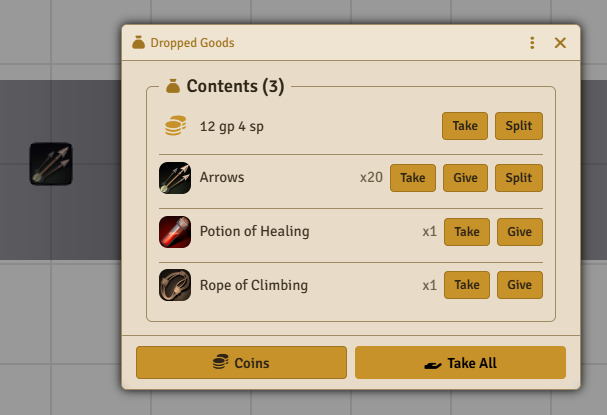
Coins appear as their own row with Take and Split. Split lets any number of recipients share the coins, divided evenly within each denomination.
The pile, its map note, and its journal entry are deleted once the last item and coins are taken out.