
Level Doctor
Wiki updated as of 0.1.0 (Oct 2026)The Level Doctor checks a scene for problems that make levels misbehave. Open it from Level Doctor in the token controls, or right-click a scene in the Scenes directory. It is GM-only.
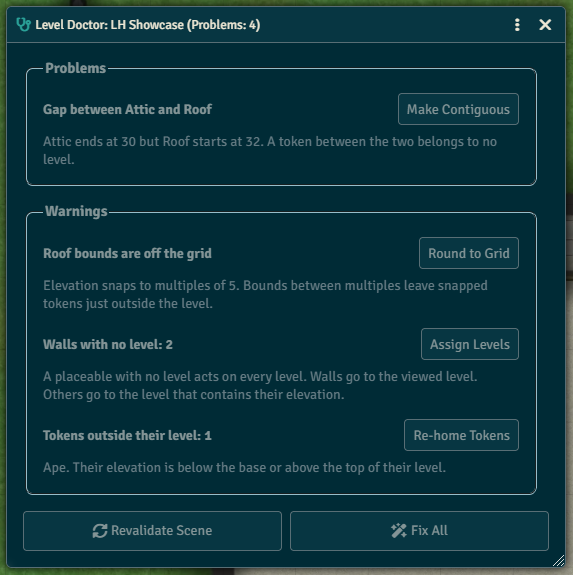
Issues are grouped into Problems, Warnings and Notes. An issue with a fix has a button that applies it. Fix All applies every available fix and checks the scene again, since one fix can reveal another. Revalidate Scene runs the checks again after you change the scene by hand.
Checks
Section titled “Checks”| Issue | Severity | Fix |
|---|---|---|
| The scene has no levels | Problem | Create Level |
| The scene has a single level | Note | None |
| Gap between two levels | Problem | Make Contiguous |
| Two levels overlap | Warning | Make Contiguous |
| Level bounds are off the grid | Warning | Round to Grid |
| No surface between two levels | Problem | Add Floor Surface |
| A surface is missing levels it touches | Warning | Add Levels |
| A Change Level region is on one level | Problem | None |
| A zero-height surface on a level boundary | Warning | Extend Region |
| A level shows another, but not the reverse | Warning | Make Mutual |
| Placeables with no level | Warning | Assign Levels |
| A teleport destination is not on exactly one level | Problem | None |
| A tile uses Fade occlusion | Note | None |
| A surface occludes the top level without Reveal Elevated Surface | Note | Enable Reveal |
| Restrict Light set on only the tile or only the surface | Warning | Restrict Tile, when the surface has it |
| A level image doesn’t match the scene size | Warning | None |
| A level image is fully opaque but shows lower levels | Note | None |
| A level has art in Foreground only | Warning | Move to Background |
| Tokens on a level that doesn’t exist | Problem | Re-home Tokens |
| Tokens outside their level’s elevation | Warning | Re-home Tokens |
Each issue’s hint in the window explains what is wrong.
Add Floor Surface covers the whole scene. Cut stairwells and holes out of the new region afterward.
Assign Levels puts walls on the viewed level. Other placeables go to the level that contains their elevation.