
Privacy and Health
Privacy rules
Section titled “Privacy rules”With Enable Privacy on, players see only part of each combatant they don’t own. The GM and the combatant’s owners always see everything.
Set the rules in the settings panel’s Privacy & Health tab. There is one rule per token disposition, Friendly, Neutral, Hostile, and Secret, and each one decides whether players see:
- Name
- Health: the exact value, a health estimate, or nothing
- Initiative
- Effects
The rules apply to the dock, the core combat tracker, group names, and the VS screen.
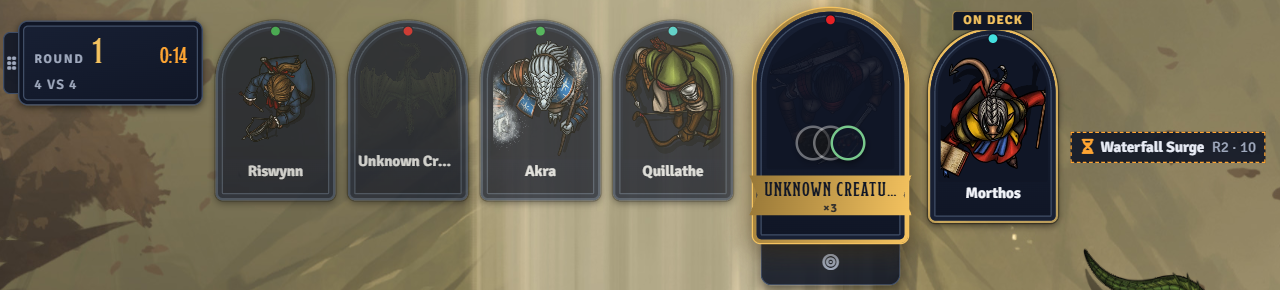
Masked names
Section titled “Masked names”A hidden name shows as Unknown Creature, the token’s name, or the actor’s name, set by Masked Name. When the name is hidden, the dock fades the portrait out too.
Hidden combatants
Section titled “Hidden combatants”Combatants the GM hides are left out of the players’ dock, and their turn marker disappears from the canvas.
With Hide Until Seen on, new combatants that no player owns join the combat hidden. Each one is revealed the first time a player’s token can see it. Revealing needs a GM online.
Health estimates
Section titled “Health estimates”With Enable Health Estimate on, health can show as a label instead of a number. The label comes from the Health Buckets list: each bucket’s label applies at or below its percentage. Edit the labels, thresholds, and colors in the settings panel, and add or remove buckets.
Estimates show on dock cards wherever a privacy rule allows them. Health Labels on Tokens also puts the label under each token’s nameplate during combat, always or on hover.