
Importing from MATT
Right-click a scene in the Scenes sidebar and choose Convert MATT to Glyph. Only a GM sees this option, and only on a scene with at least one Tile carrying Monk’s Active Tile Triggers data. Monk’s Active Tile Triggers itself doesn’t need to be installed or active; Glyph reads the data already stored on the Tiles.
Choosing it opens a review dialog covering every MATT tile on that scene at once; there’s no way to convert a subset. Nothing is written to the world until you click Commit.
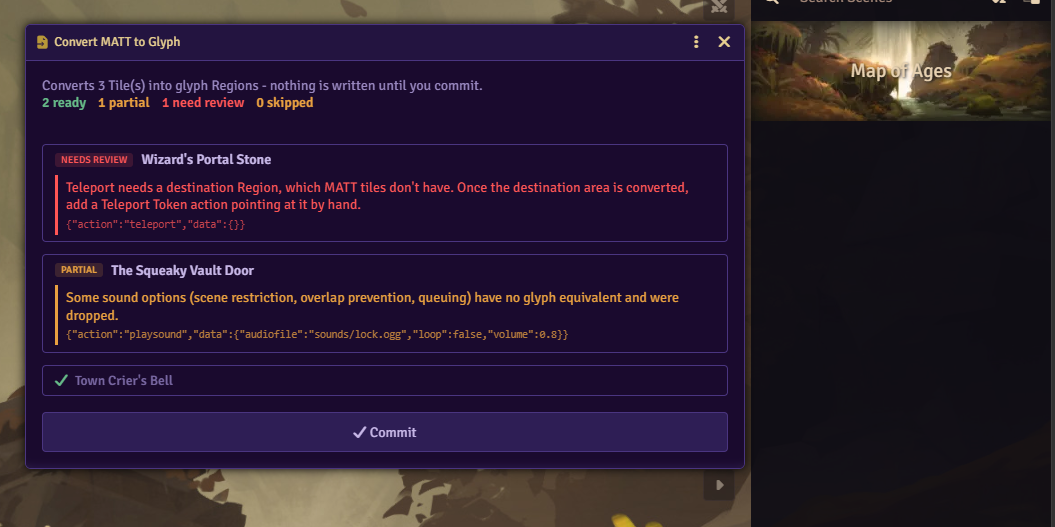
Review dialog
Section titled “Review dialog”Every converted MATT action gets one of four statuses:
| Status | Meaning |
|---|---|
| OK | Converted with no change in behavior. |
| Partial | Converted, but check the note; the behavior is close but not identical, or something was dropped. |
| Needs Review | Couldn’t convert. A stub Macro stands in, for you to write by hand. |
| Skipped | Left out on purpose; the action had no effect to reproduce, or it could never run in the converted chain. |
A tile with nothing but OK statuses shows as a single checked row. Any other status expands the tile into a list of notes, each shown next to the original MATT data it came from. Tiles needing attention are listed first.
A Tile with no visible texture, and nothing in its own converted chain still pointing at it, is marked as an invisible marker. It’s deleted rather than kept and linked.
Committing
Section titled “Committing”Clicking Commit creates the Regions, closes the dialog, and reports how many Regions were created and how many actions need manual review.
For each converted Tile, Glyph creates one Region on the scene, named after the Tile, or “MATT Import” if the Tile had no name. The Region is shaped to the Tile’s bounds, or traced to its image if the Tile had MATT’s Use Alpha option set. It holds one trigger behavior with the converted program. A Tile MATT had marked inactive converts to a disabled trigger.
The source Tile is kept and set as the trigger’s Linked Tile if it’s visible, or if the converted program still targets it directly. Otherwise the Tile is deleted, and any Tagger tags it carried move to the Region instead. A kept Tile’s Monk’s Active Tile Triggers data stays on the document, unused. A Tile with a MATT image list keeps that list, now readable by Change Tile Image.
An action with no automatic conversion becomes a stub Macro named “MATT import: <action>”, holding the original MATT action data in a comment to work from. The trigger’s program calls that Macro in its place.
A Teleport Token action whose destination was a point, a Tile, or a Scene creates a new Region named “Teleport Destination” on the target scene, sized to match. A destination that named a Tagger tag needs no new Region.
Committing deletes the source Tiles it doesn’t keep. Back up the world first if you want a way back to the original MATT setup.
MATT settings
Section titled “MATT settings”These tile-level settings carry straight over. See Trigger Configuration for what each field does.
| MATT setting | Glyph field |
|---|---|
| Restriction | Restricted Tokens |
| Controlled | Restricted To |
| Chance | Chance |
| Minimum Required | Minimum Required |
| Cooldown | Cooldown |
| Per Token | Once Per Token |
| Vision | Requires Vision |
| Allow Paused | Allow When Paused |
| Use Alpha | Trace Tile Image |
MATT’s Pointer setting has no Glyph field; Glyph already shows a pointer cursor over any Region listening for a click or hover event.
Trigger types
Section titled “Trigger types”| MATT trigger | Glyph event |
|---|---|
| Enter | Token Enters |
| Exit | Token Exits |
| Enter or Exit | Token Enters and Token Exits |
| Create | Token Created Inside |
| Movement | Token Moves Within |
| Movement Stops | Token Moves In and Token Moves Within, once the token’s movement has ended |
| Elevation | Token Moves Within, only when elevation changed |
| Rotation | Token Rotates Inside |
| Click, Right Click, Double Click, Double Right Click | Clicked, Right-Clicked, Double-Clicked, Double-Right-Clicked |
| Hover In, Hover Out, Hover | Pointer Hovers In, Pointer Hovers Out, or both |
| Combat Start | Combat Starts |
| Combat End | Combat Ends |
| Round | Combat Round Advances |
| Turn | Combat Turn Starts |
| Turn End | Combat Turn Ends |
| Ready | Scene Loads |
| Darkness | Scene Darkness Changes |
| Lighting | Canvas Lighting Changes |
| Time | World Time Changes |
| Door | Whichever of Nearby Door Opens, Closes, Locks, or Unlocks the walls pointing at this Tile enable |
| Manual | No event; runs on demand |
See Events for what each of these fires. Combat Start and Combat End fire once for the whole encounter, with no triggering token. A converted chain built around “the current token” needs a collection in its place instead.
Every converted trigger can be run on demand, through an @Trigger link, Trigger Another Region, or a macro, regardless of its trigger types. See Running Triggers. The Tile HUD’s Run Trigger button only appears if Manual was one of the Tile’s own trigger types.
After importing
Section titled “After importing”Open every stub Macro Glyph created and rebuild the action from the comment left inside it. Open every trigger the dialog flagged Partial or Needs Review and read its note.