
Blacksmith
Wiki updated as of 0.7.0 (Oct 2026)The Iron Oath is run by a blunt, proud smith. She sells from the wall, hones and tempers the party’s own weapons, forges commissions to order, buys weapons and armor, and lets a player try to hold her hammer out for a discount.
Setting it up
Section titled “Setting it up”Create the shop with the Shop Builder and pick Blacksmith on the Basics step. See Shop Archetypes for the builder steps.
The archetype names the shop The Iron Oath and applies the Forge Bench theme on the bench chassis. It sets a warm orange accent color and loops a forge ambient track. It leaves opening hours, haggling, the tab, and restocking at their normal shop defaults. Change any of these in Shop Settings.
Applying the archetype also creates the Peddler Effects compendium if the world does not have one yet. The Sharpened and Tempered effects the smith grants live there.
Stock the shop actor with the weapons and armor you want on the wall. Browsing shows only what is in stock. See Stock and Restocking.
The shop actor needs coin to pay for steel players sell to her.
What players can do
Section titled “What players can do”The greeting changes for a first visit, a returning party, and a buyer with a light purse. From the forge floor a player picks one of these.
Show me the wall
Section titled “Show me the wall”Opens the buy list of the shop’s in-stock items. The smith comments as the cart grows. A purchase the buyer cannot cover sends them to a short refusal and back to the wall.
Honing
Section titled “Honing”What can you do for my blade? leads to blade work. Hone it quotes the hone fee.
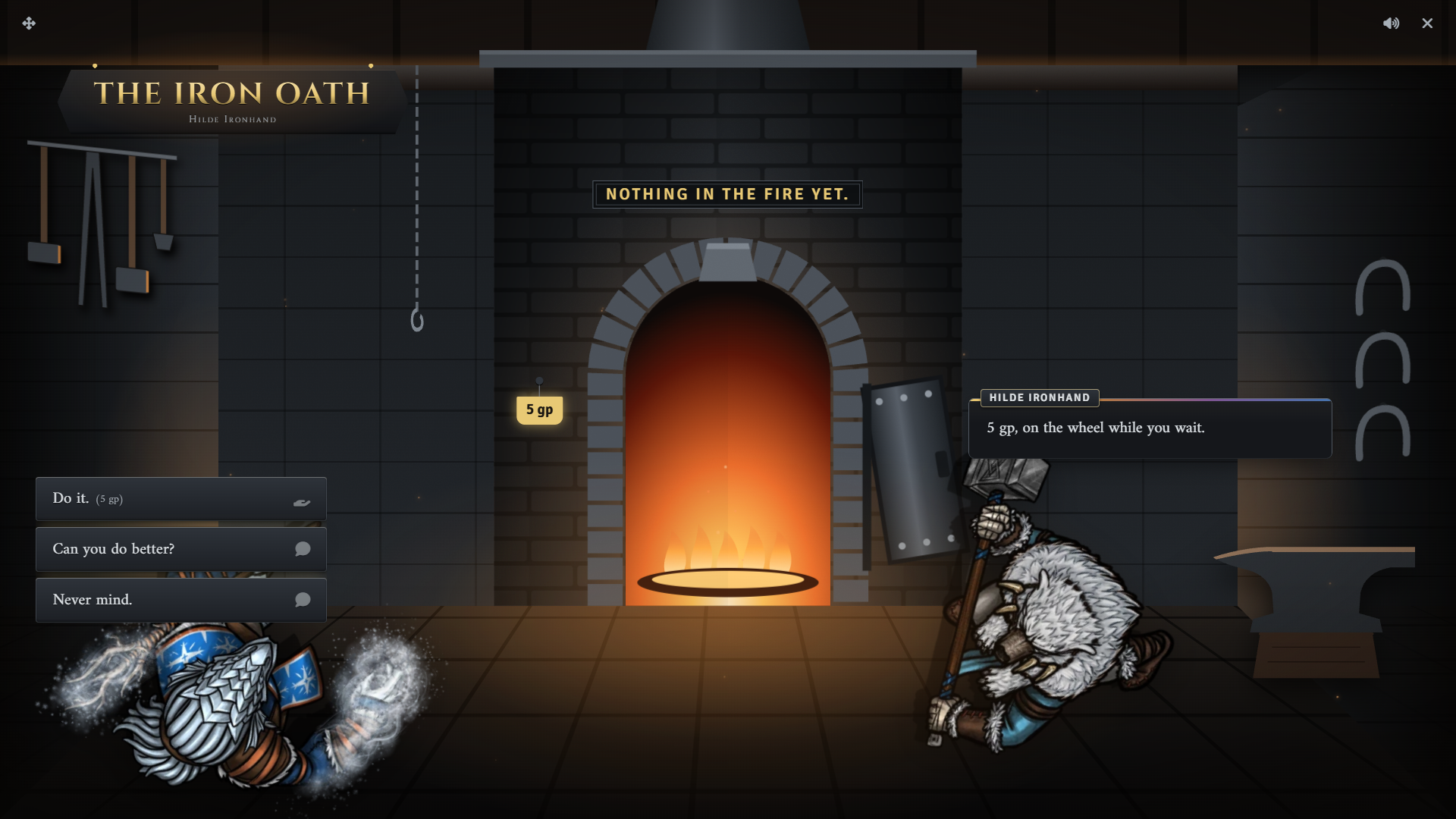
Before paying, the player can ask Can you do better? to roll a barter check against a two-step DC ladder. The result sticks to that character with this shop until the next morning, so each character gets one try a day.
| Result | Hone fee | Effect on the wall |
|---|---|---|
| Beats both | Lower | Saves a buy discount for that character |
| Beats one | Unchanged | None |
| Fails | Higher | Saves a buy markup for that character |
The discount or markup is saved as a per-player price modifier and stays on the shop between visits. Clear it under Per-Player Price Modifiers in Shop Settings.
Agreeing to the fee takes the coin right away. The player then picks a weapon from their own inventory, and the weapon receives the Sharpened effect. Backing out at the pick does not refund the fee.
Tempering
Section titled “Tempering”Temper it properly charges a higher flat fee with no barter. The player picks a weapon and it receives the Tempered effect.
Sharpened lasts a day and Tempered lasts a week. The two share a group, so a new hone or temper replaces whichever edge the weapon already carries.
Arm wrestling
Section titled “Arm wrestling”That hammer can’t be that heavy. starts a test of strength. The player rolls against a two-step DC ladder, once per day.
| Result | Outcome |
|---|---|
| Beats both | A larger buy discount on the wall until morning |
| Beats one | A smaller buy discount on the wall until morning |
| Fails | Costs goodwill with the shop |
The discount is a timed modifier and clears itself. A failed attempt is recorded in the shop’s history. See Haggling and Pricing for goodwill.
Commissions
Section titled “Commissions”Could you forge something for me? offers three tiers: a plain blade, a fitted mail shirt, and a masterwork piece. Each tier carries a suggested price and lead time, scaled to the system’s currency.
Picking a tier opens a request card where the player describes what they want. The request reaches you as a Special Order Request with the price and days filled in from the tier. Adjust either and click Send quote, or click Turn it down. A GM must be online to take the order.
The player then accepts or declines the quote. When they pay is set by Special Order Payment in Shop Settings. With Calendaria active, placing the order adds a GM reminder note to make the piece and a pickup note for the player.
A character can hold one open order with the smith at a time. The commission choice is hidden while one is pending.
Collecting an order
Section titled “Collecting an order”While an order is pending, Is my order ready? appears on the forge floor. Before the lead time passes, the smith tells the player it is not ready.
Selling steel
Section titled “Selling steel”I’ve steel to sell opens the sell counter. It lists only the weapons, armor, and shields in the player’s inventory. What the shop pays follows its Sell Modifier. See Haggling and Pricing.
Running it
Section titled “Running it”When a player asks for a ready order, a Special order window opens for you. It shows the request, the quoted price, what was paid, and what is still due.
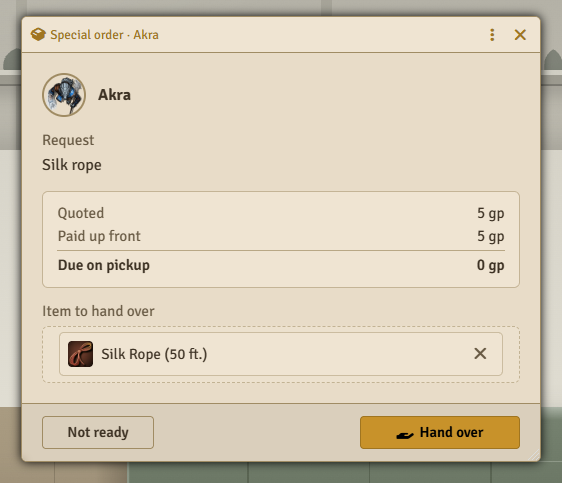
Drag the finished item into the window and click Hand over. The player sees the item and clicks Take, or Pay if a balance is due. The item goes into their inventory and the order closes.
Click Not ready instead to tell the player to come back later. Their next ask opens the window again.
The smith does not create the item, so build it yourself before the pickup.
System notes
Section titled “System notes”The barter and arm-wrestling checks use the system’s matching skill. Fees and commission prices scale to the system’s currency.
| System | Barter check | Arm wrestling |
|---|---|---|
| D&D 5e | Persuasion | Athletics |
| Pathfinder 2e | Diplomacy | Athletics |
| D&D 4e | Diplomacy | Athletics |
| Daggerheart | Presence | Strength |
| Draw Steel | Presence (Persuade) | Might |
| Call of Cthulhu 7e | Persuade | Fighting (Brawl) |
Systems without an adapter have no skill checks, so the barter and arm-wrestling choices do not appear. The hone and temper picks and the sell counter then accept any tradable item.
Sharpened and Tempered add 1 to melee weapon damage in D&D 5e and to the damage modifier in D&D 4e. In other systems they mark the weapon without changing any rolls. In Pathfinder 2e they are effect items placed on the character rather than on the weapon.
Customizing
Section titled “Customizing”Every line, choice, fee, and check above lives in the shop’s dialogue tree. Edit it in the Dialogue Tree Editor.