Skip to content

Spell Notes

Personal, per-user text snippets attached to individual spells. Useful for house-rule annotations, combat reminders, flavor text, or any detail you want to keep tied to a specific spell across every character you play.

Notes are scoped per user, per actor, per spell: two players viewing the same spell on the same actor each see their own, independent notes.


Each spell row displays a sticky-note icon when the Notes element is enabled in [[Details-Customization]]. Clicking the icon opens the Spell Notes dialog for that spell.

  • far fa-sticky-note (outlined, muted): no note saved for this user/actor/spell
  • fas fa-sticky-note (solid, highlighted): a note exists

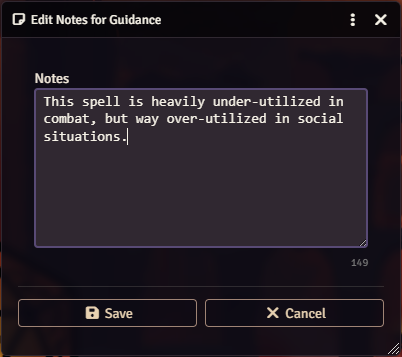
The dialog is a standard-form ApplicationV2. Its title is Edit Notes for <spell name>. It positions itself adjacent to the icon that opened it (right side preferred, falling back to left, then center when space is tight).

If the sticky-note icon does not appear, confirm the Notes element is enabled in [[Details-Customization]]. Players who do not use notes can hide the icon entirely from their UI.


Spell Notes dialog

FieldDescription
Notes textareaFree-form text. Auto-sizes between 3 and 8 rows based on existing content length.
Character counterShows characters remaining. Warning state below 20, error state when the limit is exceeded.
Save buttonSubmits the form. Disabled while the textarea is empty or over limit.
Cancel buttonCloses without saving.

The maximum note length is controlled by the world-level setting Maximum Note Length (SPELL_NOTES_LENGTH):

  • Default: 240 characters
  • Range: 10 to 1000, steps of 10
  • Scope: world (GM-only)

The textarea enforces the limit via maxlength; the Save button is disabled if the counter goes negative.


Notes live in the module’s user-spell-data compendium pack inside a journal entry named User Spell Data. Each user owns a page on that journal, identified by a per-page flag containing their userId.

  • Storage helpers: loadUserSpellData(userId) and saveUserSpellData(userId, spellData) in scripts/data/user-data.mjs.
  • Shape: { [spellUuid]: { notes: "string", actorData: { ... } } }
  • UUIDs are stored with . replaced by ~ because Foundry flag keys treat dots as nested paths.
  • A session-scoped cache avoids re-reading the journal on every lookup; the cache is cleared on journal update hooks.
  • Data is versioned (dataVersion = "3.1"); legacy HTML-table data is migrated automatically on first read.

Because notes live in the compendium pack and are keyed by UUID, they survive actor-item rebuilds and spell book re-opens — removing and re-adding a spell to an actor does not clear its note.

Saving a note refreshes every matching sticky-note icon in the current DOM so the visual state (outlined vs. solid, tooltip text) stays in sync without a full re-render.


All notes are keyed by userId (via the target-user resolver getTargetUserId(actor)) and scoped further by actor id inside the stored payload:

  • When a player opens the dialog, their own userId is used.
  • When a GM opens the dialog on a player-owned actor, the note is attached to that player, not the GM. GMs annotating their own actors use their own id; they do not see players’ notes unless they are actively impersonating the owning user.

This means two players on the same shared actor can each annotate the same spell with different text, and each sees only their own.

Notes are not broadcast — they stay local to the owning user and are never sent over the module’s socket channel, even with “shared with party” features enabled.


Notes can optionally be injected into the spell’s description on the dnd5e actor sheet, so they appear inline whenever the spell tooltip or sheet is viewed.

This behavior is controlled by the client-scope setting Inject Notes into Spell Descriptions (SPELL_NOTES_DESC_INJECTION):

ValueBehavior
off (default)Notes are only visible through the Spell Notes dialog. Descriptions are not modified.
beforeNotes are prepended to the spell’s description.
afterNotes are appended to the spell’s description.

Because the setting is client-scoped, each user chooses their own preference.

The DescriptionInjector class in scripts/ui/description-injector.mjs manages all injection. Injected content is wrapped in:

<div class='spell-book-personal-notes'><strong>Personal Notes:</strong> ...</div>

so the injector can later find, replace, or remove it cleanly with a regex.

Triggers:

  • createItem hook — when a spell is added to an actor, the description is updated if the user has a note for that spell.
  • updateItem hook — when a spell’s description changes, notes are re-applied. Updates marked with spellBookModuleUpdate: true (the injector’s own writes) are ignored to prevent recursion. A short-lived _updatingSpells Set provides a second layer of recursion guard.
  • Saving a note in the dialog — handleNotesChange(spellUuid) walks every actor and updates every matching spell copy.
  • Changing the injection setting — switching to off strips notes from every actor’s spells; switching to before or after reapplies them.

Notes text is passed through dnd5e.utils.formatText and foundry.utils.cleanHTML before injection: simple formatting is preserved, unsafe HTML is stripped.

Spell UUIDs are canonicalized via getCanonicalSpellUuid before lookup, so compendium copies and actor-owned copies of the same spell resolve to the same note entry.


The sticky-note icon is rendered by buildNotesIcon in scripts/ui/spell-render.mjs. It is emitted only when:

  • The notes element is enabled in Details Customization, and
  • The spell has a resolvable UUID.

Players who don’t want the icon can disable the Notes element via [[Details-Customization]]. That is a client-scope setting, so it only affects the user’s own UI.


SettingScopePurpose
SPELL_NOTES_LENGTHworldMaximum characters per note (GM-configurable, 10–1000, default 240).
SPELL_NOTES_DESC_INJECTIONclientOff / Before / After. Controls whether and where notes are injected into spell descriptions.
PLAYER_UI_NOTESclientShows or hides the sticky-note icon on the player Spell Book UI.

  • [[SpellBook-Interface-Overview]]
  • [[Details-Customization]]
  • [[Installation-and-Settings]]