Skip to content

Multiclass Spellcasting

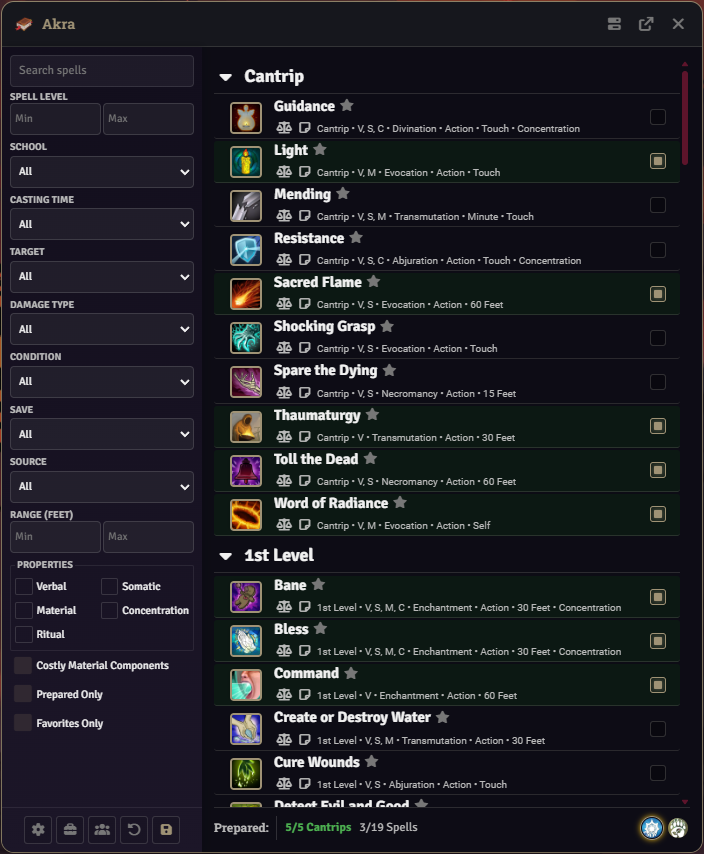
Spell Book treats every spellcasting class on an actor as an independent preparation context. Each class gets its own tab in the Player Spell Book, its own spell list, its own preparation counts, and its own rules. There is no shared pool of prepared spells between classes.


Spell Book window showing per-class tabs for a multiclass actor

One Prepare tab is generated per spellcasting class on the actor. Wizard-enabled classes additionally get a Learn tab.

  • Tabs are built from actor.spellcastingClasses by ClassManager.detectSpellcastingClasses.
  • Each tab is labeled with the class name and class icon, keyed by the class identifier.
  • The active tab is tracked by tabGroups.primary, defaulting to the first class identifier.
  • ClassManager.getWizardEnabledClasses returns every class that is the natural wizard class or has forceWizardMode: true in its rules; each of those produces a Learn tab in addition to its Prepare tab.

Adding or removing a class on the actor regenerates the tab set on the next render.

See also: [[Player Spell Book|SpellBook-Interface-Overview]], [[Wizard-Spellbook]].


Toggling a preparation checkbox does not immediately update the actor. Pending changes are held in a #pendingChanges map keyed by tab id (class identifier).

  • Switching tabs calls _savePendingChanges for the outgoing tab and _restorePendingChanges for the incoming tab, so checkbox state on every tab is preserved for the session.
  • Save writes all pending changes across all tabs in a single actor update.
  • Cancel / closing without saving discards the map.

This means a multiclass character can adjust preparations on several tabs in one pass, then commit everything at once.


Each class’s spell list is independent and is configured in [[Spell Book Settings|Spell-Book-Settings]] under that class’s entry.

  • The assigned list is stored in the customSpellList field of the class’s rules (UUID or array of UUIDs).
  • customSubclassSpellList adds a subclass overlay resolved by spell-list-resolver.mjs.
  • If a class has no list assigned, its tab displays a “No spell list assigned” notice with a button that opens Spell Book Settings scrolled to that class (_buildNoListNotice).

Changing the assigned list after spells are prepared triggers a confirmation dialog that unprepares any spells no longer on the new list, for that class only.

See also: [[Class-Rules]], [[Spell-Book-Settings]].


Prepared spells are tracked per class using the sourceItem field on each spell item.

  • sourceItem is set to class:<identifier> (for example, class:wizard) by buildClassSourceItem.
  • The actor flag preparedByClass stores prepared spell keys in the form <classIdentifier>:<spellUuid>.
  • Saves go through SpellManager.saveClassSpecificPreparedSpells, which only affects spell items whose sourceItem matches the class being saved.
  • ClassManager.getSpellClassIdentifier is the canonical reader for attribution.

A spell that exists on multiple class lists appears on each relevant tab independently.

  • Preparing a spell on class A does not prepare it on class B; each class has its own prepared set.
  • When one class has a spell prepared and another class is viewing the same spell on its own tab, a cross-class tag chip is shown on the spell name (CSS variable --sb-tag-cross-class) so the player can see the spell is already covered by another class.
  • Each independent preparation creates a separate spell item on the actor with its own sourceItem, so a wizard/cleric who prepares the same spell on both classes will have two distinct items.

Each class computes its own cantrip and spell maximums, shown in that tab’s footer.

  • Cantrip max: SpellManager.getMaxCantrips(actor, classIdentifier) reads class scale values (class, subclass, _classLink) using the cantrip scale keys configured in the CANTRIP_SCALE_VALUES world setting, then adds the per-class cantripPreparationBonus.
  • Spell max (leveled preparation): derived from the class’s spellcasting config plus the per-class spellPreparationBonus.
  • Known spells (classes with a known progression such as bard and sorcerer): derived via the class’s scale value, modified by spellPreparationBonus.
  • Counters in each tab’s level headings and footer reflect only that class’s prepared count against that class’s max.

Over-limit behavior is informational: if notifyGm is enabled, a notification is posted when a class’s prepared count exceeds its max. Preparation is not blocked by the max.


Each class can override the global rule set through [[Class-Rules]].

  • Per-class configuration covers cantrip swapping, spell swapping, ritual casting mode, showCantrips, custom spell list, preparation bonuses, and forceWizardMode.
  • Rules are resolved per class via RuleSet.getClassRules(actor, classIdentifier).
  • Defaults for each class under each rule set come from RuleSet._applyLegacyDefaults / _applyModernDefaults.

Any class can be made to behave like a wizard by enabling forceWizardMode in its Class Rules entry.

  • Detected by ClassManager.getWizardEnabledClasses alongside the natural wizard class.
  • Produces a Learn tab for that class, backed by its own spellbook journal.

Each wizard-enabled class keeps its own spellbook independent of any other wizard class on the same actor.

  • WizardBook stores each spellbook as a separate journal entry in the spell-book pack, flagged with actorId and classIdentifier.
  • Copied-spell tracking uses the per-class flag wizardCopiedSpells_<classIdentifier>.
  • Free-spell allowance, cost multiplier, and time multiplier are computed per class from that class’s rules.

A character with, for example, a Wizard class and a homebrew class set to Force Wizard Mode will have two Prepare tabs, two Learn tabs, and two journal-backed spellbooks.

See also: [[Wizard-Spellbook]].


Ritual casting mode is configured per class in Class Rules and applied during save by SpellManager.

  • Always (from spellbook): class keeps a ritual-mode copy of every eligible ritual spell from its spellbook / list. Wizard defaults to this. Ritual items are auto-injected on save — they carry class:<identifier> in sourceItem and are created or removed as part of the save for that class.
  • Prepared only: ritual casting requires the spell to be prepared for that class. Cleric, druid, and bard typically use this mode.
  • None: class has no ritual casting support.

Modes coexist cleanly in a multiclass: a cleric with prepared and a wizard with always on the same actor each maintain their own ritual set, scoped by sourceItem.


Per-class cantripSwapping and spellSwapping rules decide whether the long-rest swap window opens for that class.

  • On a long rest, LONG_REST_COMPLETED is set on the actor.
  • When the Player Spell Book opens with that flag set, any class whose rules permit a swap contributes to the swap prompt.
  • A multiclass with mixed swap rules gets a prompt listing each class that needs a swap; classes with cantripSwapping: none and spellSwapping: none are skipped.

See also: [[Long-Rest-Behavior]] (if applicable in your build), [[Class-Rules]].


Spell slots follow the standard dnd5e system rules and are not managed by Spell Book.

  • Leveled slots are computed by dnd5e’s own prepareSpellcastingSlots, which handles multiclass slot pooling natively per the rules.
  • Warlock pact slots remain separate from leveled slots, as computed by dnd5e.
  • Each class tab displays the slots relevant to that class’s preparation mode (spell or pact), as returned by ClassManager.getClassPreparationMode.

Spells granted by class features, subclass features, feats, or items are detected by flags.dnd5e.cachedFor or system.prepared === 2.

  • These spells are labeled with an A pill and cannot be unprepared through the UI.
  • Granted spells do not count against the per-class preparation limits used for UI counters.
  • Special preparation methods (innate, atwill) are filtered out of normal per-class preparation logic.

Loadouts are scoped per class.

  • Opening the Loadouts dialog uses the currently-active tab’s class identifier as scope.
  • Loadouts saved while viewing one class are not visible under another class.
  • Applying a loadout only touches spells attributed to that class’s sourceItem.

See also: [[Spell-Loadouts]] (if applicable in your build).


When a class is no longer present on the actor, ClassManager.cleanupStaleFlags prunes module data for that identifier:

  • Class rules entries under classRules
  • Per-class prepared spell keys under preparedByClass
  • Per-class cantrip and spell swap tracking
  • Per-class wizard flags (wizardCopiedSpells_*, wizardRitualCasting_*)

The rebuilt preparedSpells flag reflects only the remaining classes. Journal entries for removed wizard classes are not auto-deleted and can be cleaned up manually from the spell-book compendium if desired.