
GM Approval
With GM approval on, a player who finishes a character sends it to a review queue instead of creating it. Characters you build yourself are created straight away.
Turning it on
Section titled “Turning it on”Turn on Require GM Approval in Settings. Turning it off releases every player locked by a pending submission.
What players see
Section titled “What players see”Submitting
Section titled “Submitting”Finishing the character submits it for review. A submission made while no GM is connected joins the queue when a GM next connects.
Waiting
Section titled “Waiting”While a submission is pending, the creation window is read-only and shows a banner.

On approval
Section titled “On approval”The player gets a notice that the character was approved, and the new sheet opens for them.
On rejection
Section titled “On rejection”The player gets a Submission Rejected notice showing your reason, with two choices:
- Restore from Submission reopens the character as submitted, ready to edit and send again.
- Start Over discards it and opens a blank creation window.
The reason also appears as a dismissible banner in the player’s creation window.
What the Gamemaster sees
Section titled “What the Gamemaster sees”The pending banner
Section titled “The pending banner”A floating banner appears while submissions are waiting. Its Open Queue button opens the queue. A dismissed banner comes back when the queue changes.
The Pending Approvals queue
Section titled “The Pending Approvals queue”You can also open the queue from the Pending Approvals Queue entry in module settings. The oldest submission sits at the top.
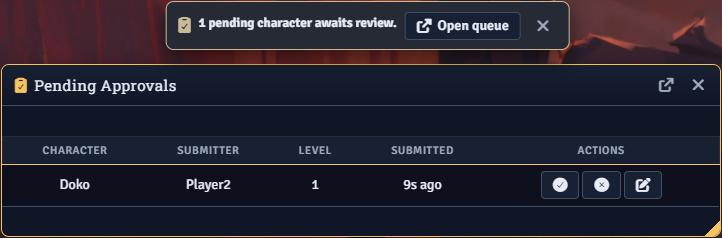
Each pending row has three actions:
- Review opens the submission in the creation window. Approve there creates the character with your edits, and Reject prompts for a reason.
- Approve as Submitted creates the character without opening it.
- Reject prompts for an optional reason, which the player sees.
Only the active GM can resolve submissions. Another GM’s approve or reject leaves the submission in the queue.
Pending submissions are stored in a world journal named Hero Mancer 2 Pending Approvals, which players cannot see.
Review reminders
Section titled “Review reminders”With the Don’t Forget module active, each new submission creates a review reminder for every GM. See Integrations.
Archiving resolved submissions
Section titled “Archiving resolved submissions”Approving or rejecting a submission deletes it. With Archive Submissions on, resolved submissions move to a journal named Hero Mancer 2 Approval Archive instead. View Archive in the queue header lists them with their outcome. Each archived row has a restore button that returns the submission to the pending queue. Clear Archive deletes every archived submission after you confirm.
Approval events in chat
Section titled “Approval events in chat”Each stage whispers a chat card to every GM and the submitting player.
- The submission card has a Review button that opens the queue.
- The approval card links to the new sheet.
- The rejection card shows your reason and gives the player an Open Hero Mancer 2 button that reopens the rejection notice.
For developers
Section titled “For developers”Scripts can open the queue and submit characters through the API. The approval events are listed under Hooks.