
Elevation Sync
Wiki updated as of 0.1.0 (Oct 2026)Changing elevation
Section titled “Changing elevation”When a token’s elevation moves into another level, the token moves to that level once its movement finishes. If the new elevation falls inside more than one level, a dialog asks which level the token moves to.
If you were viewing the old level with the token selected, your view follows it to the new level.
Turn this off for the world with Change Level With Elevation. Turn it off for one scene by unchecking Levelheaded: Sync Elevation in the Levels tab of Scene Config.
New tokens
Section titled “New tokens”A new token with no elevation lands on the viewed level at its floor. A token with an elevation lands on the level that contains it, preferring the viewed level.
Land At
Section titled “Land At”The level palette in the Token HUD has a Land At select. It sets where a token lands when you move it to another level from the HUD:
| Option | Result |
|---|---|
| Floor | The token lands on the destination level’s floor. |
| Same Height | The token keeps its height above the floor. |
| Same Elevation | The token keeps its exact elevation. |
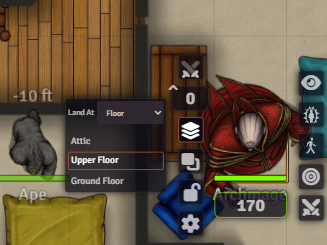
The same choice applies to Change Level in the token’s Placeables context menu. The selection is saved per client as the Land At setting.