
Magic Shop
Wiki updated as of 0.7.0 (Oct 2026)The Magic Shop opens as The Secondhand Patron. Its keeper is a theatrical dealer who sells from open shelves, appraises what players carry, recharges and binds magic items, buys magic items, and keeps the best stock in a locked case that players earn their way into.
Setting it up
Section titled “Setting it up”Open the Shop Builder from Create Peddler Shop in the merchant’s actor sheet header and pick Magic Shop on the Basics step. To convert an existing shop, pick Magic Shop in the Dialogue Archetype field of Shop Settings. The archetype hub covers both routes.
The archetype applies:
- The dialogue tree
- The shop title The Secondhand Patron
- The Sigil Bench theme on the bench chassis
- A violet accent color
- An arcane ambient track
It sets no opening hours, haggling, tab, or restock schedule. Configure those yourself in Shop Settings if you want them.
Choosing a room
Section titled “Choosing a room”Sigil Bench has two rooms: Orrery Study and Chalk Circle. A new shop starts in the Orrery Study. Switch with the Room field in the Appearance section of Shop Settings. The stock, keeper, and conversation are the same in either room. See Themes and Chassis for the layout editor.
Stocking the shelves and the case
Section titled “Stocking the shelves and the case”The open shelves sell everything in stock that is not marked Back Room.
The locked case sells only items marked Back Room on the Stock tab. Tick that column for each piece you want behind glass. If no items are marked, the case opens empty.
Back-room items stay off the open shelves unless the buyer meets one of the shop’s Back Room conditions in Shop Settings. A buyer who meets one sees those items on the open shelves too. Leave the conditions blank to keep the case the only way in. See Stock and Restocking for the stock list and restock schedules.
What players can do
Section titled “What players can do”The greeting offers the open shelves, the case, an appraisal, the workbench services, the curio counter, and the arcane check. Some of these appear only under the conditions below.
Appraisal
Section titled “Appraisal”A player picks an item from their character’s inventory and pays the keeper’s fee. Before paying, the player can try to barter the fee down with the system’s barter skill. A good barter lowers the fee and gives that character a discount on the shop’s prices. A bad barter raises the fee and marks up that character’s prices. Either change is a per-player modifier that stays on the shop. You can delete it under Per-Player Price Modifiers in Shop Settings. See Haggling and Pricing.
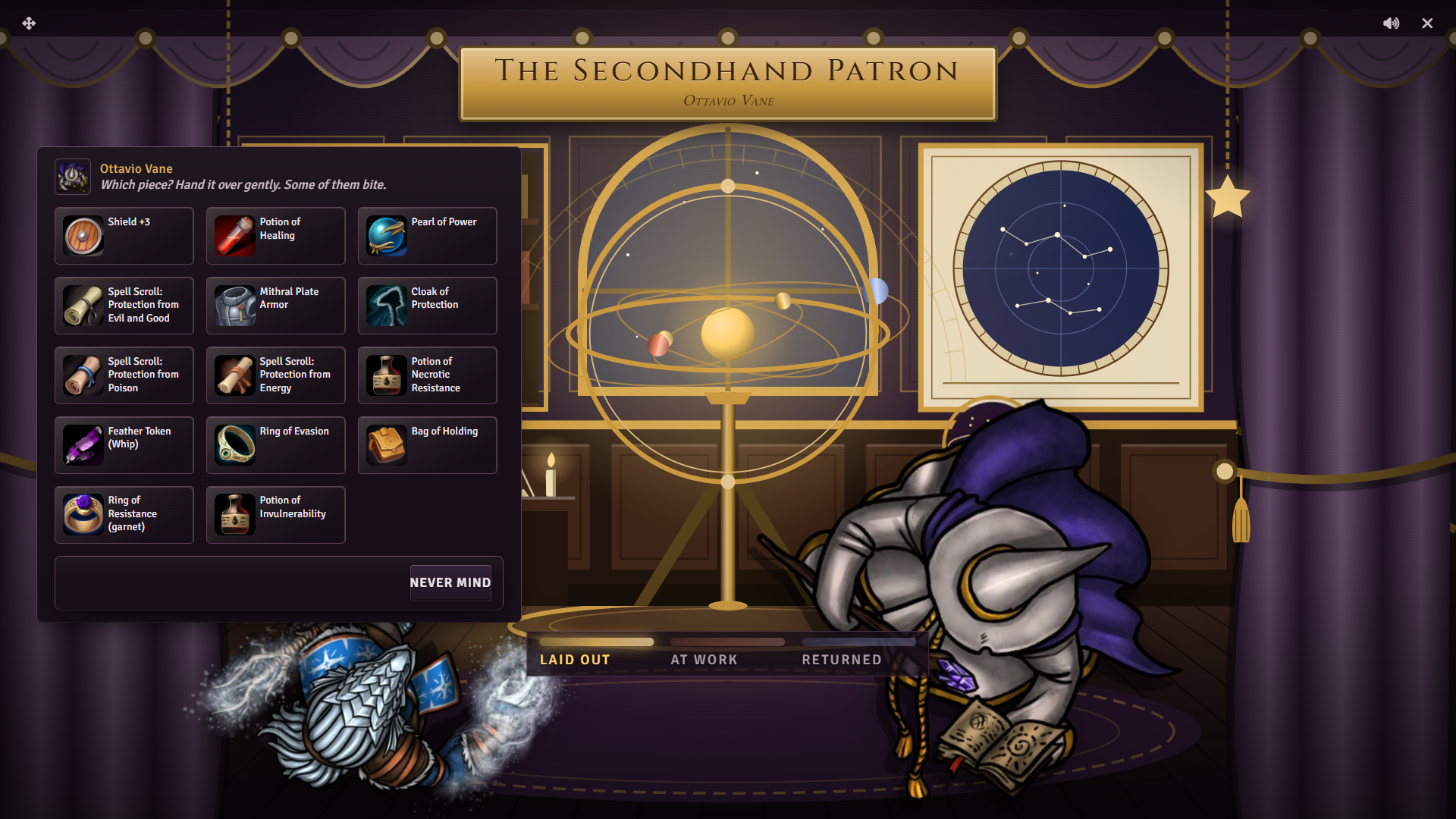
After paying, the player rolls the system’s appraisal skill. A system without skills rolls a flat d20 instead. The result has three outcomes:
| Result | What happens |
|---|---|
| Failure | The keeper cannot read the item and asks the player to come back tomorrow. The fee is not refunded. |
| Success | The item is identified if it was unidentified. The case opens to that character until morning, and the shop pays more for anything they sell until morning. |
| Strong success | As a success, with a larger sell bonus. |
The item list shows only items that are unidentified or count as magic in the active system. See System notes.
The arcane check
Section titled “The arcane check”A player who has not yet opened the case can offer to prove their arcane knowledge. They roll the system’s arcane skill against the keeper’s sigil. A success opens the case to that character until morning. A strong success also gives a discount on purchases until morning. A failure closes the option for the day.
This option needs a system with skills.
The locked case
Section titled “The locked case”Show me the case appears in the greeting once a character has passed an appraisal or the arcane check that day. It works like the open shelves, limited to in-stock Back Room items.
Workbench services
Section titled “Workbench services”Can you work on something of mine? opens the workbench when the active system supports recharging or attuning. The player picks an item that needs the service and pays a flat fee.
- Recharge something restores an item’s spent uses.
- Bind something to me attunes the item to the character. If the item will not take, or the character has no free attunement slot, the keeper offers the fee back.
The item lists show only items that need the service. Recharge has no refund.
The curio counter
Section titled “The curio counter”I have pieces to sell opens a sell screen that lists only the character’s magic items. Shop sell rates and any appraisal bonus apply.
Every appraisal, arcane check, and barter is once per character per day. Each resets in the morning.
Running it
Section titled “Running it”Peddler handles the rolls, fees, identification, recharges, and attunement inside the conversation. Rolls post to chat. The bench shows each appraisal or service moving from laid out, to at work, to returned.
System notes
Section titled “System notes”Magic item detection and services come from the active system adapter.
| System | Counts as magic | Services |
|---|---|---|
| D&D 5e | Items with the Magical property | Identify, recharge, attune |
| Pathfinder 2e | Items the system marks magical | Identify, recharge, attune |
| D&D 4e | Items with a rarity or an enhancement bonus | Identify, recharge |
| Draw Steel | Items with the Magic keyword | None |
| Other systems | Every tradable item | None |
In Pathfinder 2e, attuning invests the item, and recharge works on consumables with uses. With no services, the workbench option does not appear and appraisals do not identify.
The rolls use the system’s mapped skills:
| System | Appraisal | Barter | Arcane |
|---|---|---|---|
| D&D 5e | Investigation | Persuasion | Arcana |
| Pathfinder 2e | Crafting | Diplomacy | Arcana |
| D&D 4e | Perception | Diplomacy | Arcana |
| Draw Steel | Reason (Forgery) | Presence (Persuade) | Reason (Magic) |
| Call of Cthulhu 7e | Appraise | Persuade | Occult |
| Daggerheart | Instinct | Presence | Knowledge |
Customizing
Section titled “Customizing”Open the tree in the Dialogue Tree Editor to change lines, fees, and conditions. A fee lives in two places: the choice’s cost and the keeper’s quoted line. Change both together.