
Randomizer and Compare
Randomizer
Section titled “Randomizer”The Randomize button sits in the footer of the creation wizard. It does not appear in the level-up wizard or while you review a submission. You can turn it off in Settings.
After a confirmation prompt, the Randomizer overwrites the name, identity, ability scores, and hit points. Equipment, biography, and advancements stay as they are.
Identity covers species, class, subclass, and background. Only the primary class row is filled, so multiclass rows keep their picks.
Ability scores use the method picked on the Abilities tab. Point Buy spends points on random abilities until nothing more is affordable. Standard Array deals the array out at random. Manual Formula presses Roll Stats and assigns from the rolled pool. See Ability Scores.
Hit points switch to an automatic method. When manual is the only method the world allows, hit points are left alone.
Compare
Section titled “Compare”Compare lines up pinned species, classes, subclasses, backgrounds, or feats side by side.
Pinning options
Section titled “Pinning options”Each option in the identity dropdowns has a pin button. So does each feat card in the feat browser. Clicking a pin again removes it.
The Compare button stays disabled until two options of the same kind are pinned. Closing the compare window clears the pins in that category.
Reading the comparison
Section titled “Reading the comparison”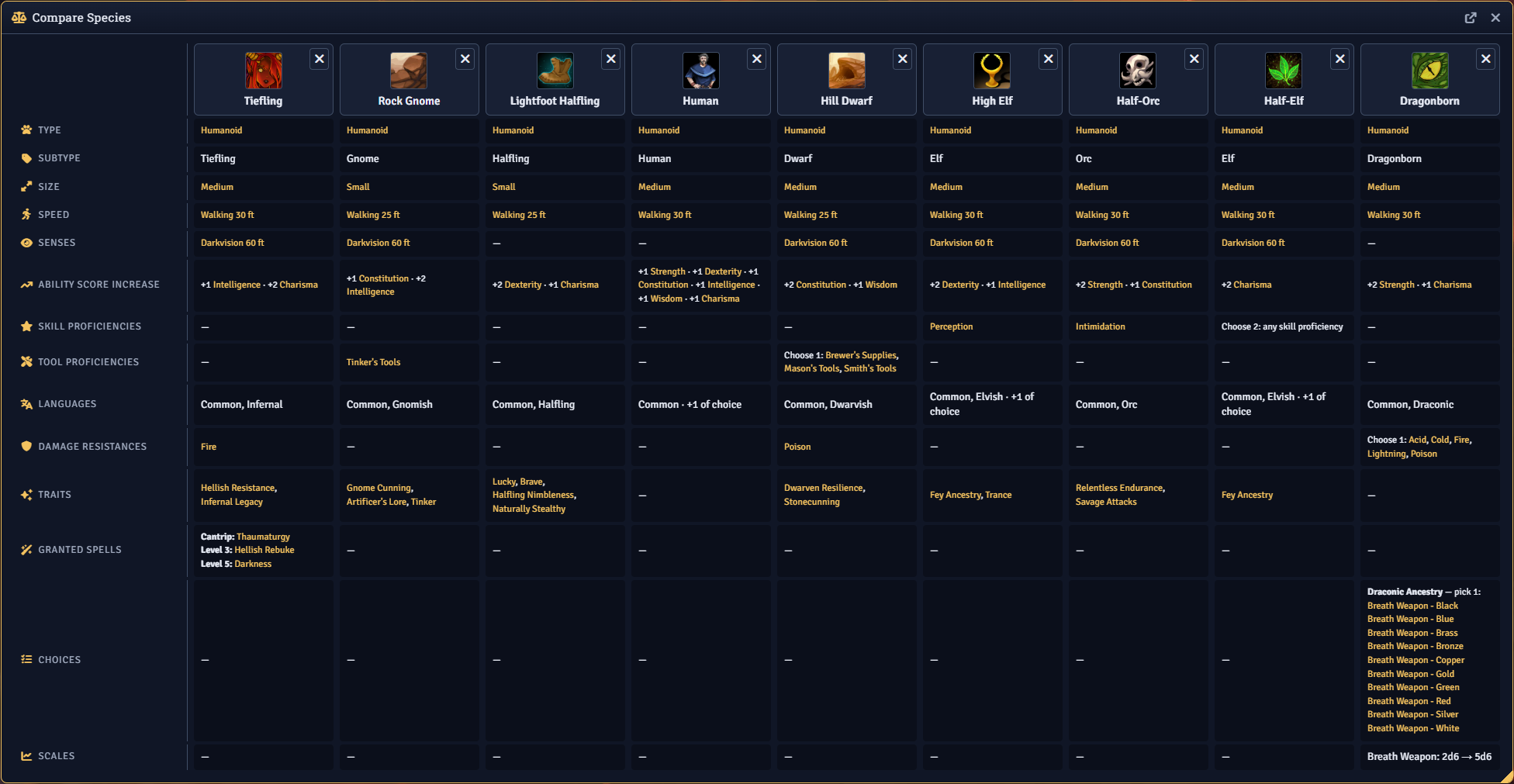
Clicking a column’s name opens that option’s item sheet. The remove control in the column header drops the pin, and removing the last column closes the window.
When pinned feats share a name across rules editions, a banner says so.
Rows depend on the category. A row is hidden when no pinned option has anything to show for it.
| Category | Rows |
|---|---|
| Background | Ability score increase, granted feat or feature, skills, tools, languages |
| Species | Creature type, size, speed, senses, ability score increase, skills, tools, languages, resistances and immunities, traits, granted spells, choices, scale values |
| Class | Hit die, primary ability, saving throws, armor, weapons, tools, skills, languages, resistances and immunities, spellcasting, starting wealth, ASI and feat levels, subclass unlock level, granted spells, choices, scale values |
| Subclass | Parent class, spellcasting, skills, tools, languages, resistances and immunities, features by level, granted spells, choices, scale values |
| Feat | Category, source and rules edition, minimum level, ability score increase, action type, damage, skills, tools, languages, resistances and immunities, granted spells, choices, scale values, repeatable |