
Advancements and Feats
The Advancements tab collects the benefits a character’s class, subclass, species, and background grant. The player makes the choices those advancements offer here.
How chips work
Section titled “How chips work”Until a class is chosen on the Identity tab, the tab only prompts for one.
Advancements are grouped into a section per source: the background, the species, and each class. A class section splits into blocks by level. With more than one class, the section title names the class and its assigned level. During level-up, advancements from items the character already owns appear in a separate Features section.
Benefits the character receives automatically appear in a read-only Granted list, sorted by type. Entries link to their compendium item or rules reference where one exists.
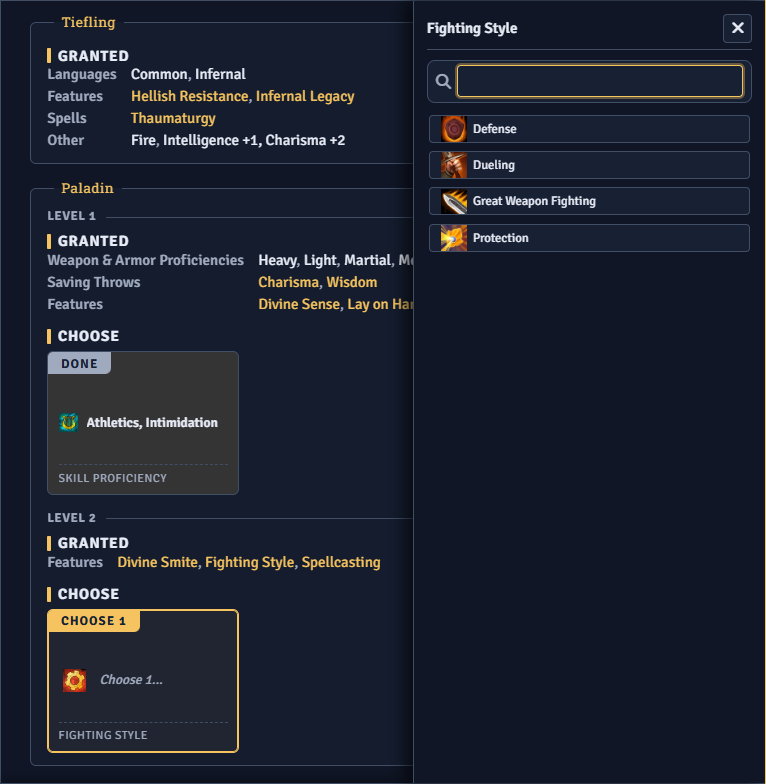
Each choice appears as a chip that shows how many picks it expects. Clicking it opens a picker. The chip lists the picks made so far and switches to Done once every pick is made. An advancement with no valid options shows an error chip and is skipped.
An item a row grants, or one the player picks, can carry choices of its own. Those appear as additional chips in the same block.
Choosers
Section titled “Choosers”The picker matches what the advancement offers:
- Skill, language, tool, and trait choosers list the available proficiencies, saving throws, weapons, or armor.
- Item choosers with a fixed pool of options open the same picker. An open-ended item choice opens the system’s Compendium Browser instead.
- Size chooser appears when the species offers more than one size. A species with a single size gets no chip.
- Spellcasting Ability chooser appears when a granted or chosen spell allows more than one spellcasting ability.
The picker has a search box. On a choice with more than one pick, the header counts picks against the maximum, and the remaining options lock once the maximum is reached.
An item option that requires another item stays hidden until that item is selected. Removing the required item drops the dependent pick too. Items already picked on another advancement are left out of the list.
An item choice that allows a swap adds a Replace tile listing the items granted at earlier levels. Choosing one to drop adds an extra pick to the choice. Left on None, nothing is replaced.
Once an open-ended choice is filled, its chip carries a Reset Choice control that clears the picks.
Ability Score Improvement or feat
Section titled “Ability Score Improvement or feat”At levels that grant an Ability Score Improvement, the chip carries an ASI button. When the advancement allows a feat, it also carries a Feat button.
Raising ability scores
Section titled “Raising ability scores”ASI opens a dialog for spending points across abilities with plus and minus controls. Each ability shows its resulting score and modifier. A counter shows the points remaining, and Confirm commits the choice.
The plus control stops when the points run out, at the advancement’s per-ability cap, or at the highest score the dialog allows. Abilities the system never improves are left out. Abilities this advancement cannot improve are greyed out. A fixed bonus from the advancement shows as a +N granted tag.
After confirming, the chip shows the chosen increases and a Reset Choice control.
Picking a feat
Section titled “Picking a feat”Feat opens the feat browser. Once a feat is chosen, the chip shows its name and icon and links to the feat. A Reset Choice control clears the pick and brings back the ASI and Feat buttons.
The feat browser
Section titled “The feat browser”The feat browser lists the feats from the system’s configured compendium sources, with a search box for feat names. If no feat compendium is indexed, the browser points to the system’s source settings.
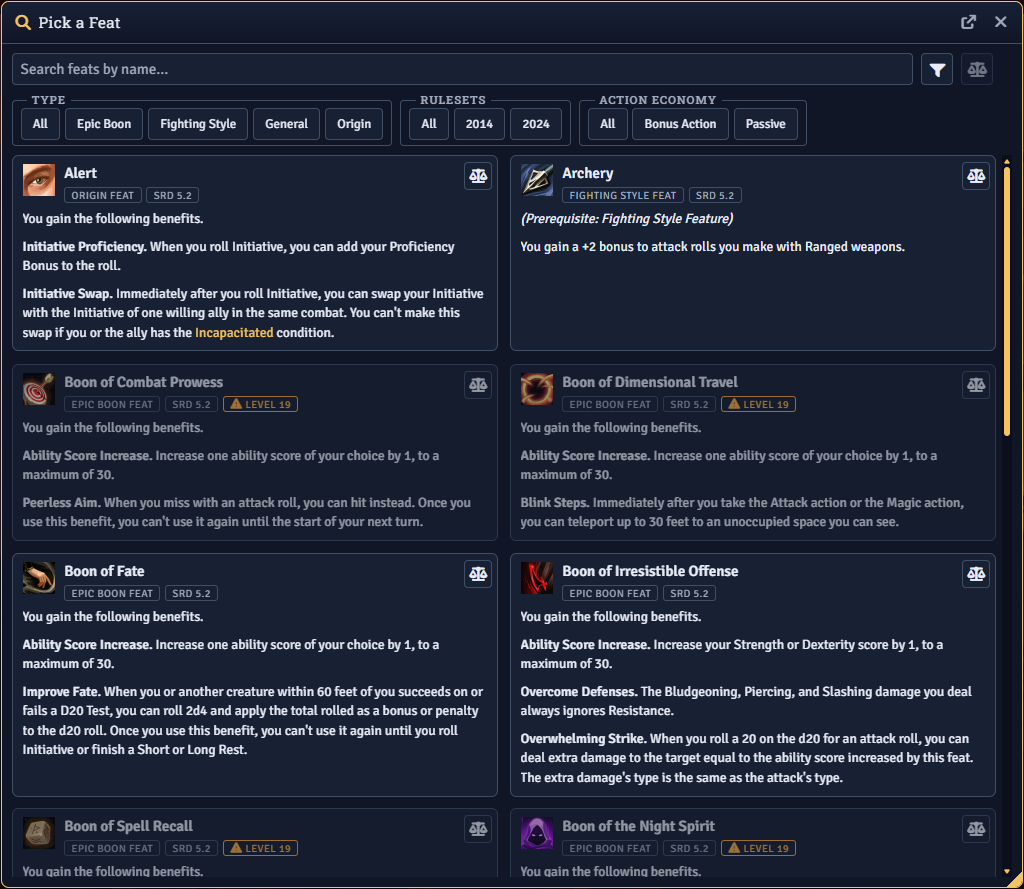
Filters narrow the list:
- Type limits the list to a feat category.
- Rulesets limits it to one ruleset.
- Sources limits it to one sourcebook.
- Action Economy filters by Action, Bonus Action, Reaction, or Passive.
- Ability Increase shows feats that can raise a chosen ability.
- Grants has toggles for feats that grant an ASI and feats that grant a spell.
- Only Feats You Qualify For hides feats whose level prerequisite the character does not meet. It also hides non-repeatable feats the character already has. This checkbox appears only during level-up.
Prerequisites at a glance
Section titled “Prerequisites at a glance”Each feat card shows its level prerequisite, with a warning when the character’s level is too low. Repeatable feats are flagged Repeatable. Feats that grant or choose a spell carry a spell marker. The current pick is marked Selected.