
Recipes and Templates
Recipes
Section titled “Recipes”Open a Region’s configuration sheet, go to its Behaviors tab, and click the wand icon beside Add Behavior. Only a GM sees this button. It opens the Recipes picker.
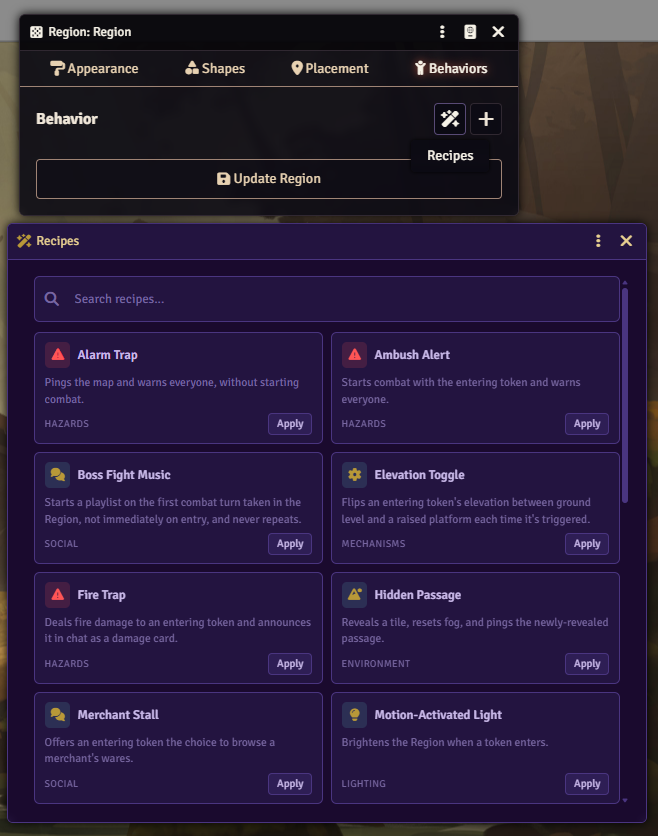
A search field above the cards filters the list by name, description, or category.
Clicking Apply on a card creates every RegionBehavior the recipe needs on the Region whose sheet you opened the picker from, with no further prompts. A recipe that points at a Tile or a destination Region is created with a placeholder reference; open the new behavior afterward and set it to the document you actually want.
A recipe that needs a module you don’t have active doesn’t appear in the picker at all.
| Category | Recipe | What it does | Requires |
|---|---|---|---|
| Movement | Multi-Choice Portal | Asks an entering token to pick a path, then runs a different program per choice. | |
| Movement | Stairway / Change Level | Prompts an entering token to move between the scene’s levels. | |
| Movement | Teleporter | Moves an entering token to a destination Region, on this scene or another, with a ping. | |
| Lighting | Motion-Activated Light | Brightens the Region when a token enters. | |
| Lighting | Timed Light Switch | Reveals a Tile while a token is inside, hides it again on exit. | |
| Hazards | Alarm Trap | Pings the map and warns everyone, without starting combat. | |
| Hazards | Ambush Alert | Starts combat with the entering token and warns everyone. | |
| Hazards | Fire Trap | Deals fire damage to an entering token and announces it in chat as a damage card. | |
| Hazards | Pit Trap | Deals bludgeoning damage, knocks the token prone, and announces it in chat as a damage card. | |
| Hazards | Poison Gas Trap | Poisons an entering token and announces it in chat. | |
| Hazards | Pressure Plate | Knocks every token currently in the Region prone at once. | |
| Hazards | Spike Trap | Deals piercing damage to an entering token and announces it in chat as a damage card. | |
| Hazards | Trap | Knocks an entering token prone and announces it in chat. | |
| Utility | Rest Area | Announces a token settling in to rest and advances game time by 8 hours. | |
| Utility | Turn Warning | Warns a token at the start of its combat turn while it’s inside the Region. | |
| Social | Boss Fight Music | Starts a playlist on the first combat turn taken in the Region, and never repeats it. | |
| Social | Merchant Stall | Offers an entering token the choice to browse a merchant’s wares. | |
| Environment | Hidden Passage | Reveals a Tile, resets fog, and pings the newly revealed passage. | |
| Mechanisms | Elevation Toggle | Flips an entering token’s elevation between ground level and a raised platform on each trigger. | |
| Mechanisms | Toggle Switch | A persistent on/off lever: each entry flips a stored state and a Tile’s visibility to match. | |
| FXMaster | Shelter From the Storm (FXMaster) | Suppresses weather in the Region and clears any active weather effects on entry. | FXMaster |
| Tagger | Marked Target (Tagger) | Tags an entering token and announces it in chat. | Tagger |
Templates
Section titled “Templates”Every trigger’s General tab has a Template control. Its dropdown lists your own saved templates under “Your Templates,” plus the bundled examples grouped by category. An entry that needs an inactive module, or a game system other than the one it was written for, doesn’t appear.
Clicking Apply copies the selected entry’s whole configuration and program onto the trigger, overwriting what was there.
Clicking Save as Template asks for a name, then writes the trigger’s current configuration and program to a world compendium named “Glyph Trigger Templates.” Glyph creates that compendium the first time you save a template into it.
Bundled examples
Section titled “Bundled examples”Glyph ships 40 example triggers as starting points, one action each. The Template dropdown groups them by category: Audio (3), Messaging (8), Token (10), Variables (1), Tagger (1), FXMaster (2), Scene (9), Tile (4), and Logic (2).