
Floor Stack
Wiki updated as of 0.1.0 (Oct 2026)Floor Stack adds several levels of equal height to a scene. Open Scene Config, go to the Levels tab, and click Create next to Levelheaded: Create Floor Stack.
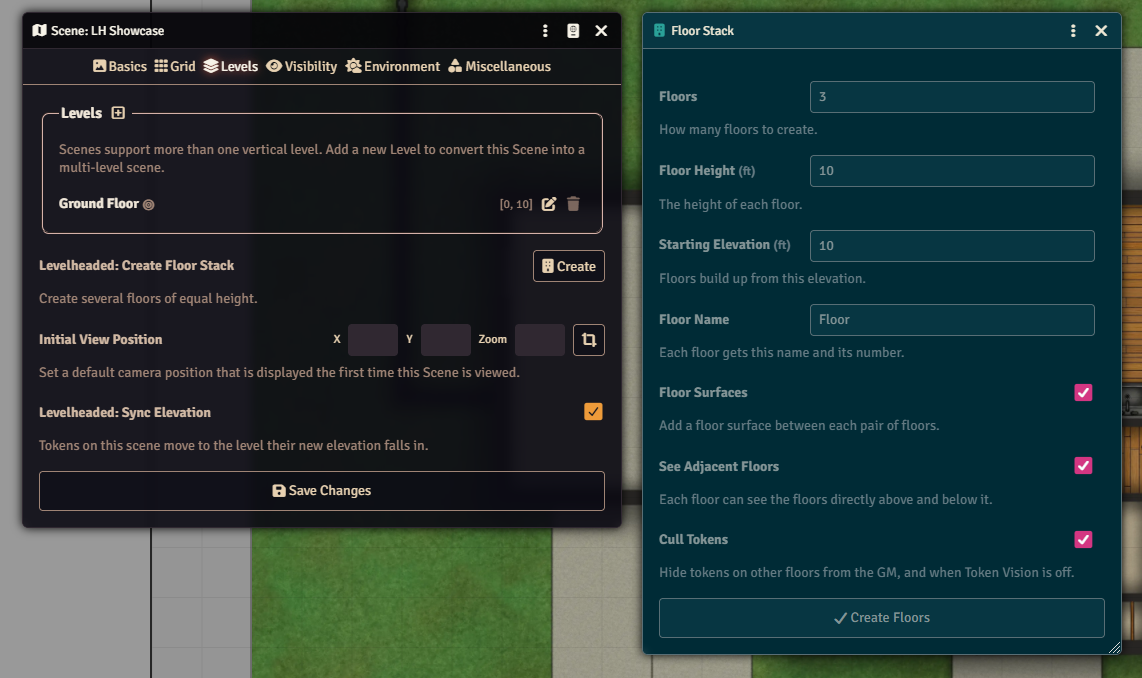
| Field | What it does |
|---|---|
| Floors | How many floors to create. |
| Floor Height | The height of each floor. |
| Starting Elevation | The bottom of the lowest new floor. Starts at the top of the scene’s highest level. |
| Floor Name | Each floor gets this name and its number. |
| Floor Surfaces | Adds a floor surface between each pair of floors. |
| See Adjacent Floors | Each floor can see the floors directly above and below it. |
| Cull Tokens | Hides tokens on other floors from the GM, and when Token Vision is off. |
When the Starting Elevation meets the top of an existing level, the stack joins that level. Floor Surfaces and See Adjacent Floors also apply between it and the lowest new floor.
New levels
Section titled “New levels”When you create a level directly on top of another, Levelheaded adds a floor surface between them. Turn this off with Add Floors to New Levels.