
Program Editor
The Program tab holds a separate action tree for each handler: every event this trigger subscribes to, plus Manual. Pick which one you’re editing from the Editing dropdown at the top of the tab. Each entry is listed by its raw event key rather than the friendly name shown on the General tab, so match it against the events you picked there.
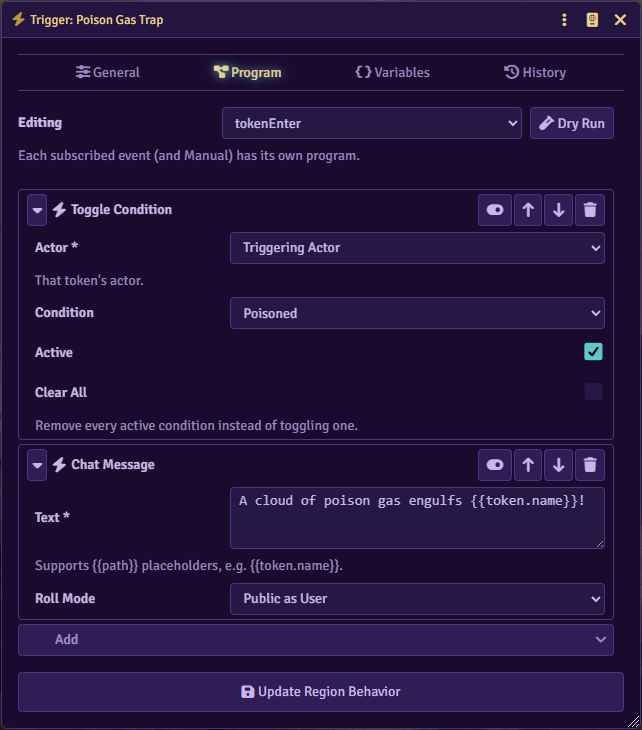
Editing the tree
Section titled “Editing the tree”Every node in the tree shows an icon, a label, and a row of controls: enable/disable, move up, move down, and delete. Disabling a node skips it when the program runs without removing it from the tree. A node with fields or child slots also gets an expand/collapse arrow; collapsing it hides its fields and children without changing anything.
Some slots are optional, such as an If node’s false branch. An empty optional slot shows an Add button instead of a slot header; adding to it creates the slot, and a remove button on a filled optional slot deletes it and everything inside.
Adding a node
Section titled “Adding a node”Each slot ends in an Add control. Clicking it opens a searchable list of node types grouped by category, including Structural, Flow, and Variables covered on this page, plus the action categories covered in Actions. Type to filter by name.
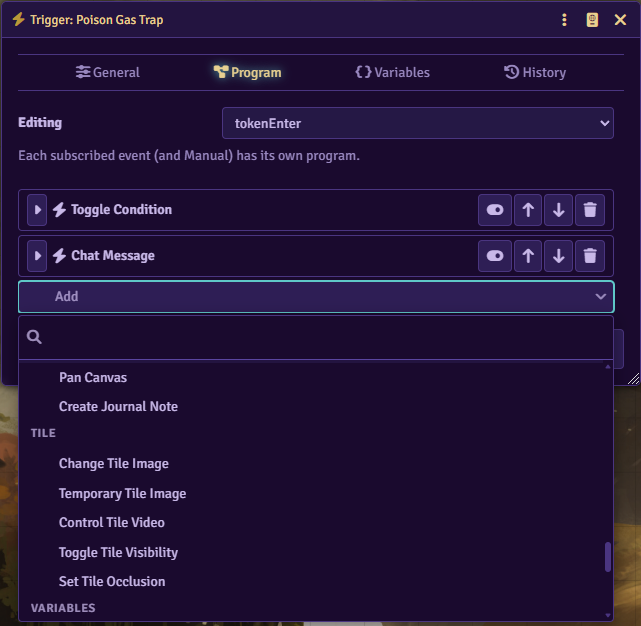
If a node is missing a required field, Glyph can’t save the tree. A warning banner appears above the tree, and the change is lost on reload until the field is fixed.
Flow control nodes
Section titled “Flow control nodes”| Node | What it does |
|---|---|
| Sequence | Runs its own list of actions in order. Every slot in the tree is a Sequence. |
| If | Branches on a condition: one set of actions if it’s true, another if it’s false. |
| For Each | Repeats its actions once per item in a collection. |
| Go To | Jumps to a Landing elsewhere in the same program. |
| Landing | A named jump target for Go To. |
| Call Handler | Runs another of the trigger’s handlers to completion, then continues after this node. |
| Wait | Pauses the run before continuing. |
| Next Item | Skips the rest of the current For Each pass and moves to the next item. Outside a For Each it ends the run. |
| Stop Remaining Actions | Halts the rest of the run. |
Condition syntax for If and For Each’s filter is covered in Placeholders and Conditions.
For Each
Section titled “For Each”| Field | What it does |
|---|---|
| Collection | Which list of items to iterate. See Placeholders and Conditions for the built-in collections. |
| Randomize Order | Shuffles the collection before filtering, picking, or limiting it. |
| Filter | A condition; only items where it’s true continue. |
| Limit | Stops after this many items. Ignored once Pick is set to anything but All. |
| Pick | Narrows the list to a single item instead of iterating all of it. |
| Pick By | The dot-path compared for the Lowest/Highest pick modes. Defaults to name for Lowest Name/Highest Name. |
| Pick Index | The 0-based position used when Pick is Index. |
Pick modes: All, First, Last, Random, Lowest, Highest, Lowest Name, Highest Name, and Index.
Go To and Landing
Section titled “Go To and Landing”Go To’s Limit caps how many times that jump can be taken; 0 means unlimited. A Landing’s Stop When Reached ends the run if the program reaches it by falling through in normal order. The actions after such a Landing then only run when something jumps to it directly with Go To.
Wait’s Formula field overrides Seconds. It accepts a dice formula, a low-high range of seconds, or a comma-separated list of options, one of which is picked at random.
Variables in the tree
Section titled “Variables in the tree”Set Variable and Set Current Collection write values the rest of the program, and other actions, can read as {{variables.name}}. See Placeholders and Conditions.
Set Variable
Section titled “Set Variable”| Field | What it does |
|---|---|
| Name | A */? wildcard pattern matches every variable already stored on the target. |
| Value | Entered as JSON. Leaving it blank clears the matching variable, or every matching variable with a wildcard name. |
| Trigger | Defaults to this trigger. Another trigger can be named directly, by its Region, or by a Tile linked to it. |
Set Variable writes to the same stored list shown on the trigger’s Variables tab, so what it sets there persists across fires and appears in that list too.
Set Current Collection
Section titled “Set Current Collection”| Field | What it does |
|---|---|
| Name | The variable this collection is stored under. |
| Source | Which collection or reference to resolve from. Not used for Clear. |
| Action | Add, Remove, or Replace the stored list with the newly resolved items, or Clear it. |
| Use Owners | Stores the resolved items’ owning users instead of the items themselves. |
Unlike Set Variable, this only exists for the current run; it isn’t written to the trigger’s stored variables.