
Stairs
Wiki updated as of 0.1.0 (Oct 2026)Connect Levels
Section titled “Connect Levels”Select one or more regions, then click Connect Levels in the Regions controls. The scene needs at least two levels.
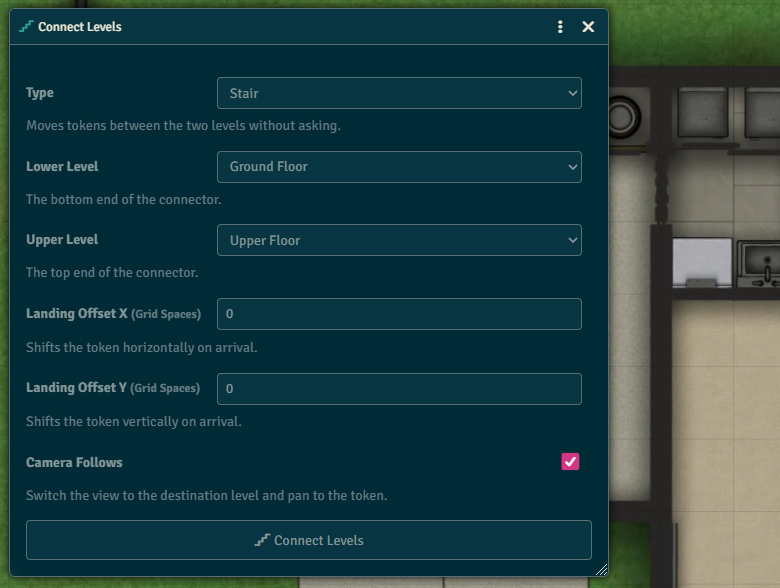
| Field | What it does |
|---|---|
| Type | Stair moves tokens between the two levels without asking. Elevator stops at every level between the two and asks which floor. |
| Lower Level | The bottom end of the connector. |
| Upper Level | The top end of the connector. |
| Landing Offset X / Y | Shifts the token on arrival, in grid spaces. Stair only. |
| Camera Follows | Switches the view to the destination level and pans to the token. Stair only. |
The regions are set to span the connected levels. A stair gets a Change Level (Silent) behavior. An elevator gets core’s Change Level behavior.
Change Level (Silent)
Section titled “Change Level (Silent)”Add Change Level (Silent) to any region from its region config. A token that enters the region moves to the destination level’s floor without core’s confirmation dialog.
| Field | What it does |
|---|---|
| Destination | The Other Level, Next Level Above, Next Level Below, or a specific level. The Other Level only appears when the region is on exactly two levels. |
| Landing Offset X / Y | Shifts the token on arrival, in grid spaces. |
| Camera Follows | Switches the view to the destination level and pans to the token. |
| Movement Actions | The movement actions that trigger the level change. Leave empty for any action. |