
Quest Collector
Wiki updated as of 1.4.10 (Nov 2026)Quest Collector is a companion module by Sig. It collects every note with the Quest category into one Quest Board window. It requires Calendaria and 3DS:ATLAS.
Opening the Quest Board
Section titled “Opening the Quest Board”Open it from the Quest Board button on the HUD or the Quest Board tool in the Token controls. Both GMs and players can open it.
Each entry shows the quest’s name and start date. Click an entry to open the note. If the BigCal or MiniCal is open, it also jumps to the quest’s start date.
Quest sections
Section titled “Quest sections”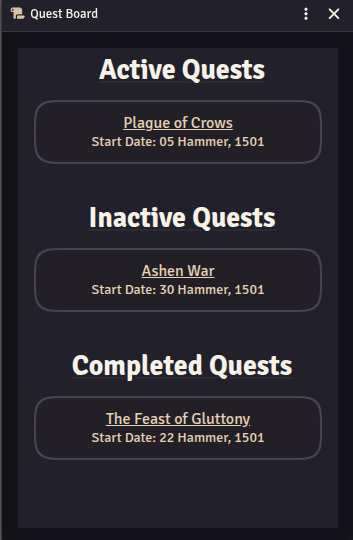
Quests sort by their visibility:
| Section | Contains | Seen by |
|---|---|---|
| Active Quests | Public quests without the Completed Quest category | GM and players |
| Inactive Quests | Author and Secret quests | GM only |
| Completed Quests | Public quests with the Completed Quest category | GM and players |
Set a quest to Author or Secret to keep it off the players’ board until you reveal it.
Completing a quest
Section titled “Completing a quest”The module adds a Completed Quest preset to the world. Add it to a quest note alongside the Quest category to move the quest into Completed Quests. The note must keep the Quest category to stay on the board.
Players cannot pick the Completed Quest category themselves.